Bravo, my friend—you hit the nail right on the head. You’ve basically got a free lunch and dinner waiting for you in San Francisco next year, assuming Los Angeles FC manages to clinch the championship.
Andrew Fox74 said:Where on earth did you find that option to disable Windows Update? All I see is the "pause updates" feature—and even then, you just get to pick how long to wait before they kick back in.
I actually followed these specific steps to get it done:
To disable Windows 10 Automatic Updates:
Head over to the Control Panel — Administrative Tools — Services Scroll down until you locate Windows Update in that list Double-click the Windows Update entry Once that window pops up, if the service is currently running, go ahead and click 'Stop' Then, set startup Type to Disabled
What is even the point of having an "on/off" option in the Windows Update settings if this is how it works? I honestly cannot believe I am being forced to run an update every single 30 days. From what I can tell—and I've asked around—none of my colleagues at work deal with this kind of constant nagging.
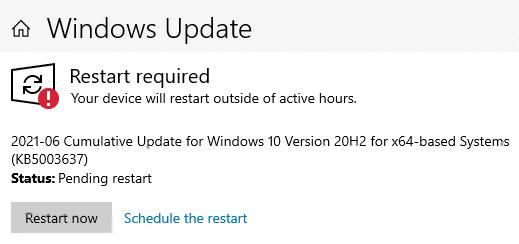
It’s driving me absolutely insane—I’m running Windows 10, and right after I finished the installation, I made sure to disable Windows 10 Automatic Updates (turned them off), yet here we are about a month later and it’s demanding an update again. Fine, I let it run through all its processes—it took about 20 minutes or so But now, after waiting roughly 15... 30 days, that same message pops up saying I need to perform an update once more. It feels like a constant loop; it keeps asking for updates even though I specifically disabled the automatic update settings. Does anyone out there actually know how to fix this persistent issue?
A friend of mine lent me an old HDD—it’s perfectly functional, by the way—which I plugged into my laptop earlier this morning So, the laptop has been running for over 12 hours now, and that dreaded black screen hasn't made a single appearance I plan to keep a close eye on things through tomorrow—I'll be monitoring it all day long—so we shall see how it behaves under pressure
So, I just ran some diagnostics using Hard Disk Sentinel, and the results are—well, they aren't great. Here is what the report is showing me: HEALTH: 11 % (critical)
The drive has 851 bad sectors on the surface. The data from those specific sectors was relocated to the spare area. I also saw 1682 errors during the data transfer process. If you happen to run into a sudden system crash, a reboot, a blue screen of death, or find yourself unable to access certain files or folders, you really ought to check your data and power cables. It’s worth trying different connections if you can—just to prevent things from getting even worse.
My laptop was working perfectly fine until just a few days ago. I’ll turn it on, get some work done, and then—after a certain amount of time—the screen suddenly goes black and displays this message:
Broadcom UNDI PXE-2.1 v15.0.11 Copyright (C) 2000-2011 Broadcom Corporation Copyright (C) 1997-2080 Intel Corporation All rights reserved. PXE-E61: Media test failure, check cable PXE-M0F : Exiting Broadcom PXE Rom No bootable device — insert boot disk and press any key
The timing is incredibly inconsistent—sometimes it happens after two hours of use, sometimes after six, and other times I can go an entire day without seeing it at all. It's quite frustrating! Does anyone have any idea what might be causing this issue?
I have a list of about 1,000 songs sitting in a Word document—it’s quite a massive collection!—and right now, it looks like this: Artist – Song Artist – Song Artist – Song Artist – Song
What I really need is for the list to be reformatted to look like this instead: Song – Artist Song – Artist Song – Artist Song – Artist
Is there a way to actually pull this off within Word?
Exactly—the car player just plays everything based on whatever order is listed in the track number tag. That’s precisely why I’m asking if someone could walk me through how to actually set that sequence within the Tag itself. To be clear, I already have "Mp3tag", "Tag & Rename", and "Total Commander" installed on my system. Is it actually possible to get this sorted using any of those specific programs?
I only need this for about 10 songs. Adding a number to the beginning of each track title just isn't doing the trick. On my PC, everything plays in the exact order I want—prefixed numbers and all—but the moment I plug into any external player, the sequence goes completely haywire. Some colleagues suggested that I really ought to be using a dedicated tag editor to fix this properly, which should force the playback to follow my specific order. I actually have "Mp3tag", "Tag & Rename", and "Total Commander" installed on my machine, but I honestly can't find that specific feature anywhere within them.
The sequence is absolutely critical to me—I’ve actually layered spoken word segments into every single track Because of that, they really have to play them in this specific order I've laid out. I tried installing Total Commander, but I'm having a bit of a hard time getting the hang of it—so if you're willing to walk me through the process, I would truly appreciate it.
analogwalker2 said:Look, if you have Total Commander installed on your PC, there's a simple workaround: before you move anything over to the USB, just sort everything by name on your computer first—both on the PC side and once it's on the USB—to ensure the order sticks. If that sounds a bit confusing, don't worry! I can put together a quick video tutorial for you to follow.
Look, I don't need them playing randomly by name; I need to be the one who decides the playback order. Here is the situation: On my USB drive, I went ahead and added numbers in front of each track like this: 1 Mladen Grdovič 2 Daniel Martinovič 3 Oliver Dragojevič 4 Petar Grašo When I play them from the computer, they follow that exact sequence—but the moment I plug the drive into the car, the order goes haywire! It starts with Oliver, then jumps to Mladen, then Grašo, and finally Daniele.
Alright, I'll give that Total Commander method a shot later and see if I can actually figure out how to pull it off.
I am running into the exact same headache—my car's MP3 player refuses to play my tracks in the order I actually have them arranged on my USB drive. I've heard whispers that this all comes down to the Tag data, and that you need to use some kind of software to number everything properly. I went ahead and downloaded two programs, "Mp3Tag" and "Tag&Rename", but honestly, I am struggling to wrap my head around how to actually execute the process. What I'm looking for is a way to rename the files so they follow a sequence like: 01 xxxxx, 02 yyyyy, 03 zzzzzz, and so on. Does anyone here happen to know how to make this work?
I’m currently struggling with my HP LaserJet Pro—the black ink has completely run dry, even though there’s plenty of color left in the cartridges. Is there any way to trick the machine into mixing colors to simulate black ink for printing? I have this vague memory from about fifteen years ago—back when I was first getting into tech—of being able to toggle some setting under the options menu to make this work. Does anyone here happen to know if that’s still a possibility?
I went ahead and clicked through all those links you sent my way—but honestly, it’s all so incredibly complicated that I’m having a hard time figuring out how to actually execute any of it. I was really hoping someone might have the patience to walk me through the steps rather than just tossing a bunch of links at me... Regardless, I appreciate the effort you put into it.