But I mean, why does he get to decide on his own whether he's sending someone a standard text or switching things up to a chat? What kind of logic is he even using to make that call?
So, I’ve been noticing something kind of funny while I'm sending out text messages to people in my contacts, and right there at the top before you even start typing, the header changes depending on who I'm messaging. For some folks, it shows up like this: Text message (exchanging messages with unknown) (SMS / MMS) But then, when I switch over to other people in my list, it says something totally different, like: Chat message (chatting with unknown) I was sitting here wondering, why does it label it as a "Text message" for some people but call it a "Chat message" for others? What's actually going on behind the scenes with that distinction?
So, the guys over at the repair shop just told me that getting the unlock done is going to cost $67 . Honestly, I’m sitting here staring at it, wondering if I should just bite the bullet and pay up or if I should just toss the whole thing in the trash and call it a day . I'm really torn about it
wiredcanyon94 said:You didn't mention (or maybe I missed it) if you tried a hard reset? I don't mean just the standard factory reset through the menu, but a full hardware reset. You can find a few tutorials on YouTube explaining how to pull that off. Also, have you thought about reaching out to Apple regarding this? Don't tell me you're actually thinking about tossing the tablet.
Edit: I don't own a tablet and I'm definitely not a tech expert, but there's someone in this video messing around with one that might help. Or just search for something similar on YouTube.
Well, I went ahead and followed those instructions for the hard reset, but honestly, it’s the exact same story—nothing changed. It makes me wonder, though, isn't a hard reset supposed to wipe everything clean, including all those deep-seated system protections? It feels like it should be just like formatting a hard drive on a PC where everything gets scrubbed away completely.
Man, I feel so bad about this, especially since the tablet is basically brand new—it’s only been about a year and it's sat there pretty much untouched I actually reached out to the previous owner to see if we could sort it out, but they're totally clueless on how to bypass the lock screen It's one of those situations where they just can't remember a single thing they typed in when they first set it up back in the day
The thing is, this whole situation is such a massive headache to untangle,
If everything is playing out exactly the way you're describing, I honestly don't see the point in shelling out my hard-earned cash to hire someone to fix it for me right now, It’s basically like buying a brand new car just to realize the engine is missing; there's just zero benefit in holding onto it if it isn't actually doing anything for you.
Man, I’m having such a hard time getting a hold of the previous owner, which is a total bummer because this iPad is practically brand new—hasn't even been out in the world for a full year yet. But honestly, there's one thing that's just totally tripping me up; why is it even asking for this? From everything I've gathered, whenever you do a factory reset on any tablet, it shouldn't be demanding the old user's login info like this.
So, I just picked up this tablet (it's about a year old) iPad from a buddy of mine, and even though I went ahead and wiped everything back to factory settings, we're hitting a total brick wall trying to actually get it up and running. Everything seemed fine at first—once I turned it on and picked my language, I hopped onto my home Wi-Fi without any hiccups at all. But then, this screen pops up out of nowhere: Enter your unlock PIN or sign in with your Google account I tried being a good citizen and entered my Gmail address along with my password, but instead of letting me in, it just threw this error message right in my face: "This device has been reset. To continue, sign in with a Google account that was previously synced to this device." And honestly, we're just stuck staring at it. It’s kind of wild that we can't find a way to make this thing usable after all that. Does anyone here have a clue what's going on under the hood or maybe some magic trick to fix this?
It’s honestly just like what you mentioned, my niece would probably only ever use a laptop for "lightweight web browsing without any video clips", and really nothing else besides that
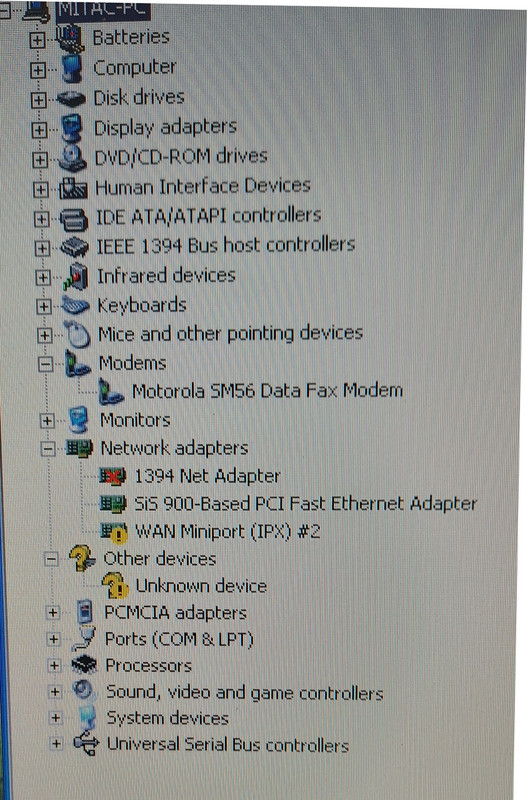
Oh, I totally forgot to mention one little detail—this thing is actually a laptop "Dell Latitude" I’ll say it again though, the machine itself runs like an absolute dream and it's surprisingly snappy, so the only real headache I'm dealing with is the internet connection Honestly, if I can just figure out how to get the Wi-Fi working, I’d love to pass it down to my niece to use, but if I can't get it sorted, I might just end up tossing it in the trash
Look, I totally get it—it’s an old laptop, and if there isn't a network card tucked away inside somewhere, I'd probably just toss it in the recycling bin because honestly, it's not worth spending a dime to upgrade it. Based on what you've shared here, can we actually tell if it has a wireless card built-in or not? Everything else about the machine runs smoothly and feels pretty snappy, but this whole internet situation is just a massive headache.
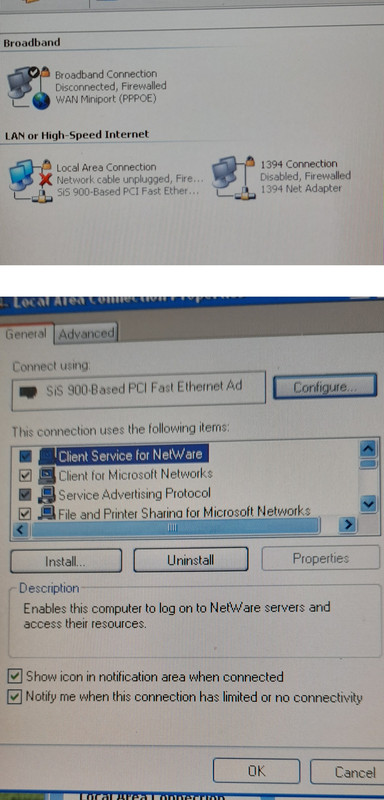
Drew Allen77 said:It has a wired connection, but no WiFi.
Wait, what do you mean it doesn't have WiFi? I've got two other laptops right here in the same room, and they're both picking up the WiFi signal without any trouble at all.
Aha, so it sounds like there probably isn't even a network card installed in there at all Honestly, if that's the case, I don't think it's worth throwing any more money or energy into this thing just to go in circles
Here’s a bit of info for you, assuming this covers everything you need!
I was just sitting here thinking about how much I still miss those old-school days when you’d fire up your computer and everything felt so straightforward, almost like driving a classic muscle car on an open highway where you actually knew exactly what was under the hood. There was this specific kind of magic to using Microsoft Windows XP Professional that you just don't see much anymore in our modern, hyper-complex tech world. It had this wonderful, breezy simplicity to it—kind of like a Sunday morning at a local diner where nothing is rushed and everything just works the way it should. Nowadays, everything feels so layered and heavy, but back then, you could just dive right in and get things done without feeling like you needed a PhD in computer science just to navigate the desktop. So, I just finished getting Service Pack 3 all installed and up and running!
I was just sitting here thinking about how much things have changed, and my mind drifted back to that old Intel Pentium 2400 MHz network setup I used to run. It’s funny how you can get so attached to a specific piece of hardware, almost like an old friend that’s been through the wars with you, especially when you look at how far we've come since those days.
Network: So, looking at my settings here, it turns out my primary IP address is just sitting there at 127.0.0.1. It’s kind of funny when you think about it—it’s like being at home and realizing you’re actually just talking to yourself in a mirror! It's that classic loopback address, basically the computer's way of saying, "Hey, I'm right here!" The primary MAC address is 00-40-D0-3A-62-30. So, I was just digging through my old hardware stash today and stumbled upon this SiS-900-based PCI Fast Ethernet Adapter, which really got me thinking about how much things have changed since the days when we were all just trying to get a decent connection to work. It’s one of those classic pieces of gear that feels like a little relic from a different era of computing, isn't it? Back then, you'd pop one of these into a slot and feel like a total tech wizard once the lights started blinking. It's funny how we used to obsess over these specific chipsets, almost like they were some kind of holy grail for getting online, whereas now everything is just seamless and built right into the motherboard without us even giving it a second thought. It definitely brings back memories of tinkering around with drivers and hoping for the best! So, I was just messing around with my old gear today and stumbled upon this classic little piece of tech—the Motorola SM56 Data Fax Modem. It’s funny how much hardware changes over the years, isn't it? You look at these things now and realize they were the absolute backbone of how we actually got online back in the day, long before everyone had high-speed fiber running through their walls. It’s one of those nostalgic bits of kit that really makes you think about how far we've come from those screeching dial-up tones to the seamless connections we take for granted now.
So, I recently picked up this older laptop running Windows XP—it’s actually surprisingly snappy and runs incredibly fast! I was thinking it would be the perfect little machine for my niece to play around with, but I've hit a bit of a snag because I have absolutely no clue how to get it connected to our home router. Honestly, I used to be able to do all this stuff in my sleep about 20 years ago, but my memory isn't what it used to be, and now I'm totally stumped. If anyone out there remembers the ropes and could walk me through it, I'd really appreciate the help! Here is a quick shot of what pops up when I click on that little icon down by the clock Does anyone know what settings I need to tweak in here to get things moving?
That site is actually pretty solid, but I was kind of wondering if there’s somewhere out there where I could just grab entire albums all at once instead of clicking through every single track individually
So, I stumbled upon this page earlier, but I’m having a bit of a hard time figuring out how to actually find and download stuff. I tried typing the artist's name and the song title right into the empty search box and hit enter, but it’s like nothing happened at all, just total silence Then I thought, okay, maybe if I just paste a link from YouTube it’ll work, but nope, still absolutely nothing going on there either Does anyone happen to know why this isn't working for me?
So, I picked up a used Dell Inspiron 15 recently and got Windows 10 all set up on it. But here’s the kicker—every thirty minutes or so while I'm actually trying to get things done, the screen just goes pitch black and hits me with this message: "Broadcom UNDI PXE-2.l vl5.0.11 Copyright (C) 2000-2011 Broadcom corporation Copyright (C) 1997-2000 Intel Corporation All rights reserved. PXE-E61: Media test failure, check cable PXE-MOF: Exiting Broadcom PXE ROM. No bootable device — insert boot disk and press any key"
I already tried a complete clean install by formatting the partition entirely, thinking that might smooth things over, but nope—same headache every single time. Does anyone have a clue what might be causing this little hiccup?