CheckEmoji Community · the emoji forum
🏠 Home 🆕 What's new ❓ Unanswered 🔥 Popular 📡 RSS Members 👥 0 online log in · register
Home › IT › Hardware › Desktops › GPU Buying Guide - (Read first post)

GPU Buying Guide - (Read first post)

Started by Kimberly Gomez34 · · 👁 296 views · 5.7K replies

📡 Subscribe to replies

Participants Kimberly Gomez34Michael King7Gerald Campbell65crimsonstag84Robert Rodriguez2Scott Mendoza88Ryan Wilson7Jesse Lopez83David Sanders4Taylor BrownAdam Moore3Benjamin King2Larry Ortiz5Amy Vaughn12Adam Williams2swiftscout21fadedorca66driftingwalker19William Hughes16swiftstag66mistymason18Jonathan Reed50hiddenpilot4Jamie Patel2 …
Adam Moore3 Adam Moore3 Regular
322 messages
joined Jun 2014
#1781 ·
Look, the guy just wants to play PES and FIFA, yet you all are arguing over two different GPUs just because one supposedly has "better" Vulkan support 😬 He should honestly just grab the cheaper option since either card will handle those games perfectly fine 😁
Jessica Nelson4 Jessica Nelson4 Member
38 messages
joined May 2017
#1782 ·
Hey, Joshua Ramos14, you could grab a high-end graphics card for $267, some protection for $67, a bottle of Jack Daniel’s, a bit of coke, and even some roses... honestly, whether you're looking to dominate the new Madden on ultra settings or just score goals in some virtual world like 🙂

...though if you’ve got your heart set on an Nvidia card, I’d suggest waiting a few weeks for that new one this guy mentioned to actually hit the shelves 🙂
Adam Moore3 Adam Moore3 Regular
322 messages
joined Jun 2014
#1783 ·
Joshua Ramos14 said:Look, you could grab a GPU for $267, some condoms for $67, a bottle of Jack Daniel's, a little coke, and some roses... and you'd be playing the new FIFA on Full HD settings while scoring goals in an AFK world 🙂

...if you really want Nvidia, just wait a few weeks for that new one this guy mentioned to drop 🙂

👍 👍 🤣 We're talking PES and FIFA here; you can easily run those on a 260X for about $300 at max settings
Arthur Thomas Arthur Thomas Member
14 messages
joined Nov 2010
#1784 ·
Do you think we'll see anything coming from NVIDIA soon that hits that R7 370 or R9 270 sweet spot, but actually has decent DX12 support? I'm looking to spend somewhere in the neighborhood of 1000-$400.
crimsonstag84 crimsonstag84 Regular
518 messages
joined Jun 2010
#1785 ·
The GTX 950 and the GTX 950 Ti... I guess we won't know the exact timing, but it probably won't be for another few months.
slysurfer14 slysurfer14 Active Member
100 messages
joined Jul 2014
#1786 ·
Intel Core i3-3220 CPU @ 3.30 GHz
Only 4GB of RAM? Man, that's barely enough to run anything these days. I guess.
ASRock H61M-DGS R2.0 motherboard.
AMD Radeon R7 200 Series graphics card.

My son got a raise at work, so he wants to grab a new GPU. His budget is up to... $1000...
I guess I'm looking for some solid advice here. Any suggestions on what to get? Also, where can I find the best deals around Chicago? Thanks in advance.
Adam Moore3 Adam Moore3 Regular
322 messages
joined Jun 2014
#1787 ·
slysurfer14 said:Intel Core i3-3220 CPU @ 3.30 GHz
4.00 GB RAM
ASRock H61M-DGS R2.0 motherboard
AMD Radeon R7 200 Series GPU

My son just got a raise at work and wants to pick up a new graphics card. Budget is up to $1000...
Looking for some constructive suggestions and advice on where to find the best deals (maybe somewhere in Chicago?) Thanks in advance!

Which exact card are we talking about? You mentioned the series, but not the specific model. Since it's an R7, it's likely some kind of 260X or 250X. Also, you really need to tell us what power supply you have before we can recommend anything. Regardless, the absolute most I would pair with an i3 is an R9 280 or a GTX 960; anything higher than that doesn't make sense because the bottleneck will be massive. You'll see it pop up occasionally in CPU-heavy games, but it's still worth getting something in that tier. For the best prices, check out: CLICK CLICK, though I'd personally steer clear of eDigital since people have had extremely negative experiences with them.
slysurfer14 slysurfer14 Active Member
100 messages
joined Jul 2014
#1788 ·
honestly my kid’s on Windows 8 and I can't for the life of me figure out how to pull up his system specs to see what's actually inside... any tips? maybe you guys could help me out...
Robert Rodriguez2 Robert Rodriguez2 Regular
353 messages
joined Jul 2015
#1789 ·
slysurfer14 said:honestly, kid's running Windows 8 and he can't figure out how to check his own specs. if anyone has a tip, help him out...

for the power supply, just pop the side panel off and read the sticker. simple as that.

you can check the GPU like this:

right-click My Computer >> Manage >> Device Manager >> Display Adapters or whatever. I'm on my phone, so I might be slightly off.😉
Kimberly Gomez34 Kimberly Gomez34 RegularOP
686 messages
joined Jul 2009
#1790 ·
To verify the power supply, you'll need to pop off the side panel of the case to check the specific model name. If this is a pre-built system, there's a 99% chance the PSU is bottom-of-the-barrel junk and won't handle anything serious. That said, it isn't a dealbreaker if $1000 you just want to run something like a GTX 960, an R9 280, or an R9 380 paired with 4GB of RAM and the current PSU—you'll still have some headroom left over
.
I'd recommend downloading Speccy. It’ll let you see if those 4GB of RAM are running as two 2GB sticks or a single 4GB stick, and it will give you the full, exact model name of your graphics card
slysurfer14 slysurfer14 Active Member
100 messages
joined Jul 2014
#1791 ·
It just says R7 200 series for the GPU
Memory is 4GB on a single stick, so I guess there’s still one empty slot left
The PSU is a Spire ATX -420W-PFC-N-PSV

I was poking around online and it looks like this card is probably worth maybe $250
Adam Moore3 Adam Moore3 Regular
322 messages
joined Jun 2014
#1792 ·
The power supply is garbage, specifically:

1 x DDR3 4GB (1x4GB) Kingmax, 1600MHz, FLGF
1 x Sapphire R9 280 3GB OC Dual-X, 3GB GDDR5 384bit, 28nm
1 x Fortron 500W Hyper Power, PPA5005003, 12cm fan

$785admin.com

Just make sure to check the exact RAM specs using CPU-Z. You really need to grab an identical match if possible, because sometimes different sticks just refuse to play nice together.
Kimberly Gomez34 Kimberly Gomez34 RegularOP
686 messages
joined Jul 2009
#1793 ·
You could also go with $33 more for the Gigabyte model—it comes with an extra year of warranty, though you’ll need to double-check if it actually fits in your case (it's 296mm)

Specifically regarding the first expansion slot, for instance (like this one listed at 315mm):
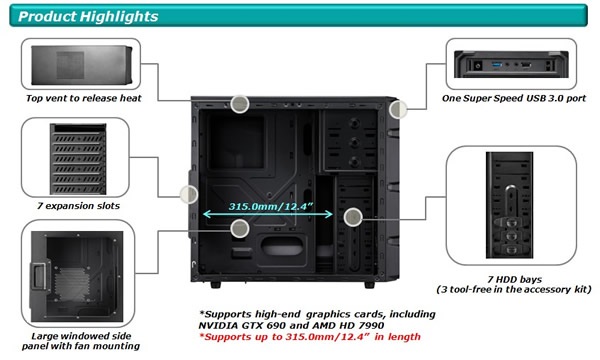
image

Otherwise, this one is a guaranteed fit, and performance-wise, they are all essentially identical.

It might also be worth looking at this option (though it runs about $67 pricier than the 2GB version)

For the power supply, this unit would work too, especially since it carries a 5-year warranty.
fadedorca66 fadedorca66 Regular
372 messages
joined Nov 2022
#1794 ·
slysurfer14 said:so I was just digging around online and it looks like it's a 250 series card

Maybe check with TechPowerUp
Kimberly Gomez34 Kimberly Gomez34 RegularOP
686 messages
joined Jul 2009
#1795 ·
If he downloaded that Speccy tool, all the details should be listed right there.
Adam Moore3 Adam Moore3 Regular
322 messages
joined Jun 2014
#1796 ·
At the end of the day, it doesn't really matter—the R7 is just a GPU, even if it turns out to be a 260X (though I doubt that, seeing as it’s practically a pre-built setup using a Spire power supply). Either way, there's a massive performance gap between the 260X and the 280/960. The main thing is to swap out that power supply and make sure he grabs the exact same RAM kit, or at least something from the same manufacturer.
Kimberly Gomez34 Kimberly Gomez34 RegularOP
686 messages
joined Jul 2009
#1797 ·
It doesn't matter which manufacturer you go with. There's a negligible chance his RAM won't be compatible—he'd have to be incredibly unlucky—but even if it is, he can easily just return it.
Adam Moore3 Adam Moore3 Regular
322 messages
joined Jun 2014
#1798 ·
Timothy Kim60 said:Different brands shouldn't be an issue. There's a tiny chance his RAM might not be compatible, but he'd have to be incredibly unlucky for that to happen. If it doesn't work, he can just return it easily.

It shouldn't matter, though there's even less risk if he just grabs another stick of Kingston to match what he already has. It's not a huge difference, but still... there's a difference.
slysurfer14 slysurfer14 Active Member
100 messages
joined Jul 2014
#1799 ·
Thanks everyone for the help. Finally grabbed the PSU, the RAM, and that R9 380 Nitro GPU
Matthew Wood16 Matthew Wood16 Newcomer
2 messages
joined Jul 2015
#1800 ·
I am looking to acquire a new graphics card with a budget of up to $1,200. If you have anything suitable, please feel free to reach out via private message...

You must log in or register to reply here.

Log in Register

🔗 Similar threads