You might want to grab CrystalDiskInfo—it’s a handy little tool for checking the health of your external drives. If the status shows up blue, you’re golden. If it hits yellow, consider it a heads-up that things are getting dicey... but if it turns red? Yeah, that means the drive is pretty much on its last legs.
I've settled on these four computers—honestly, they’re the absolute best you can find for running Soma Kuna, and honestly, you won't find anything better than this here in Washington, D.C. 😁
Honestly, with the budget you've got, trying to hunt down individual parts to build a PC from scratch is going to be an uphill battle—you might be better off just grabbing a pre-built system. So, here’s a quick list of what I found...
This one actually comes with a monitor included, though it's a bit limited since it only has 2GB of RAM...
With this option, you'd just need to format the hard drive and install Windows 7, especially since it's running a Windows 10 preview right now...
This one looks pretty decent too, and it's being sold as a full bundle with the monitor and all that extra gear—it's just a shame about that 2GB of RAM...
If you're asking me? I'd probably lean toward either the first link or the last one. With the last one, you get a solid monitor that you could potentially sell later, plus you can always upgrade it to 4GB of RAM down the road... Anyway, I'll leave the final call to you.
Look, if you’re willing to hunt around a bit, you can actually put together a pretty solid computer with a dual-core processor and 4GB of RAM... But you didn't mention where you're located? If you let me know which city or area you're in, I could probably help you track down the best deals—basically, find the best bang for your buck in your neck of the woods.
So there's really nothing to worry about—your motherboard and all the other parts will fit just fine. It's actually a pretty spacious case since it's a standard mid-tower, so you'll have plenty of room for everything...
Are you looking at used gear or something brand new from a store? What kind of budget are we working with here? Also, do you need a monitor and other peripherals too?
Man, it's honestly not worth spending a single cent on a system that old... If you're really set on picking it up, my best advice would be to just wipe the hard drive completely and install a fresh copy of Windows XP with service pack 3... You should find that Office 2003 runs pretty smoothly on it without much trouble. I can't tell you if you could squeeze in another 256MB of RAM, though—I don't know which manufacturer or model of motherboard you're working with.
It’s totally fine $67 if you’re just looking to do some light web browsing without running into too many creepy trackers or malware—like on a site like 😁. You could just throw a fresh install of macOS with Service Pack 2 on there and call it a day...
Lol, it all looks great on paper, doesn't it? But once you actually get into the real world, things work a bit differently... Still, if you've already made up your mind on AMD, go for it! I will say though—I have to admit, that APU definitely packs more punch than an Intel integrated graphics chip.
Isn't the audio connector basically the same as the front USB—right? You just plug it into the spot on the motherboard labeled AUDIO, and then you connect the HD instead of AC '97...
Regarding Windows, what do you mean you can't install it? Is it throwing an error at you or something? And which version of Windows are you even trying to install?
Try heading into your Device Manager and uninstalling it from there—then just pull the WLAN adapter out of the USB port and give your computer a quick restart. Once the system is back up and running, plug it back in and see if that clears things up.
From what I can tell, it sounds like your motherboard might have finally kicked the bucket. If you can manage it, it’d be worth trying to grab another board with the same socket—just to pop your current processor in there and see if the PC actually boots up with a different board... Or, honestly, maybe just try swapping out the CMOS battery first? Might be worth a shot...
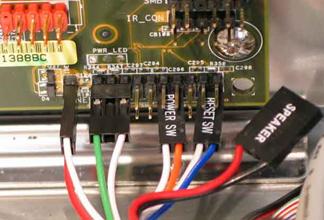
The wires you're talking about are called the front panel connections—they’re what make the USB ports, headphone jack, reset button, and power switch on your case actually work. You really have to be careful with - and +, though. For instance, take a look at this...
Here’s a quick video tutorial showing how to hook up the power supply to a motherboard—might be worth checking out if you want to see the process firsthand..
Actually, no—that big 24-pin cable serves one specific purpose, and it has absolutely nothing to do with the 4-pin CPU slot. Your power supply should have its own dedicated 4-pin connector meant specifically for the area near your processor—so just plug that in there.
As far as I know, there isn't really an "IDE-to-SATA" thing... it’s either the wide IDE connector or it's SATA (check out the photo). Basically, if you're stuck with a wide IDE drive but your motherboard only supports SATA—which is pretty much standard for all modern boards these days—you're going to need to pick up a new optical drive. You can find plenty of them on eBay, so just take a look there—just make sure you grab a SATA one.
It might not actually be a Windows issue—could be the hard drive acting up instead... Maybe try downloading CrystalDiskInfo and running a quick check to see how it's holding up?