So, I’ve been messing around with the settings on this Dell, and I’ve run into a bit of a weird situation where Windows just won't let me bump the refresh rate up from 60Hz to 75Hz at FHD resolution; apparently, the 75Hz option isn't even showing up in the menu, so I'm stuck at a max of 60, even though the monitor itself is definitely rated for 75Hz. I guess the only way I can actually toggle it over to 75 is if I lower the resolution first, which seems kind of counterintuitive, doesn't it?
So, my PC has those 24+1 slots, and I suppose I’m wondering if I’m strictly limited to using a 24+1 cable, or if an 18+1 might somehow work its way in there too?
ironcyclist58 said:You should probably just grab some cheap passive DVI-D to HDMI converters or cables here.
Thanks for the input. I guess I'm wondering where the best place would be to pick one of those up? I have a feeling I'll probably need to order it online, since it seems unlikely I'd find anything like that sitting on a shelf at Walmart or Target, and most of the specialized computer shops around here are closed anyway.
From what I can gather, it looks something like this— https://www.amazon.com/Sewell-DVI-D-.../dp/B00CQA4EEK where the HDMI end plugs into the monitor and the DVI side goes into the PC, right? Sorry if I'm being a bit of a nuisance, I don't really know much about this stuff. 😵
wiredbison272 said:Yeah, I mean, if the rig is brand new, I’m guessing you probably won't actually see anything on the monitor from the AMD card right away; it'll likely just spit out the onboard graphics instead. From what I can tell, you've got integrated graphics available too, so I suppose you'll just have to go into the BIOS and toggle those settings around.
I get where you're coming from. Regarding the connection, though—which cable should I be looking for to actually get Windows up and running? My monitor only has a VGA port, but the PC itself is just giving me DVI. Once everything is fully installed, I'll be switching over to HDMI anyway, so I guess I just need to figure this out for the initial system boot.
wiredbison272 said:exactly, he probably just needs the drivers. you should check which ports are actually on the monitor—there's a blue VGA one, then a white DVI one which looks a bit different and larger than the VGA slot.
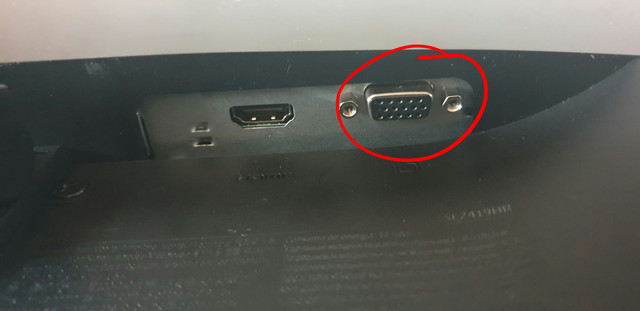
Is this the one on the monitor? Is that VGA?
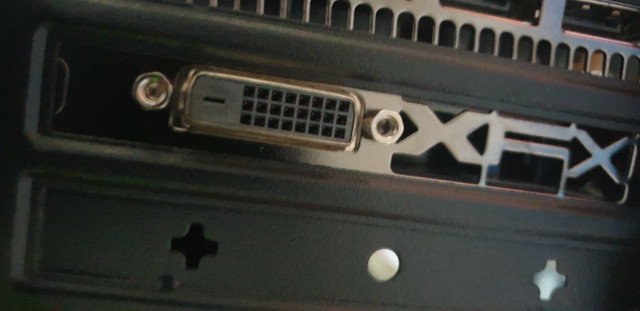
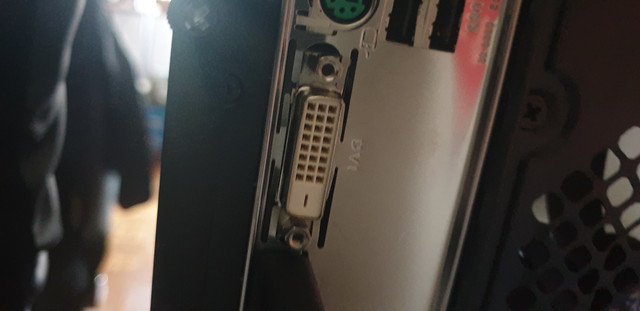
From what I can see, both ports on the PC seem to be DVI.
It looks like I might not be able to pull this off with just a standard cable, so I guess I might need some kind of converter, or maybe one of those cables that has a DVI plug on one end and a VGA plug on the other... I wonder if that would actually work?
wiredbison272 said:well, just hook up a VGA or DVI cable until you get Windows and the drivers sorted out
I don't have either of those lying around, honestly. Everything in my house runs through HDMI. I suppose I'll head down to Walmart tomorrow to pick one up. I had no idea that installing Windows wasn't possible via an HDMI cable.
EDIT: Now that I've tried connecting the TV to the PC via HDMI, it’s still giving me that "no signal" message. I guess it makes me wonder if the issue is actually with the PC itself, or if it's just some weird thing where the computer can't establish an HDMI connection until there's an OS and the right drivers installed.
Noah Miller6 said:Is it integrated graphics or what? If it’s on the PCI slot, you’re probably missing the drivers.
It isn't integrated, it's a dedicated card. I haven't even installed Windows on the PC yet, so I guess I don't really have any drivers installed either, if you think about it.
So, I just picked up a brand new monitor and a PC, and I was all set to dive into the whole Windows installation process. But here’s the thing: as soon as I plug the monitor into the PC using the HDMI cable, I get that "no signal" error message mentioned in the title. I mean, the HDMI port itself seems totally fine—it actually came right out of the box with the monitor—and I’ve made sure everything is seated properly. Just to be safe, I’ve spent the last little while playing trial and error, maybe ten times now, trying everything from swapping out the cable for my PlayStation one (which I know works perfectly) to reseating connections, rebooting the monitor, and even unplugging everything from the wall to drain the power. I don't happen to have a VGA cable lying around to test if that would work, though. I can't help but wonder if the issue might be with the PC itself? It's a new build, delivered fully assembled a couple of days ago.
I ended up picking up the Razer Kraken, and honestly, I’m pretty thrilled with them considering they sit right in that mid-range sweet spot—around $80. The sound quality is decent enough, and the mic holds its own, too.
I actually grabbed them from an HG outlet because their pricing was easily the best I could find in the States, plus they offered free shipping. I placed the order around 10:30 AM, and I guess since the delivery driver happened to be in my neighborhood anyway, he actually had them at my doorstep just four hours later. 😁
I ended up pulling the trigger on that Dell after all. After spending way too much time digging through various US retailers, I just couldn't find anything that felt like a meaningful step up in the sub-$150 range, and this one was sitting right at $105. I guess any real upgrade wouldn't even start to matter until you're looking at spending closer to $200 or more.
Timothy Kim60 said:Well, I suppose it's alright. It's probably a stretch to call it an absolute steal since there are plenty of other options out there with similar specs—like that one I mentioned earlier that comes with a five-year warranty. And if you're looking at that 1ms response time as some kind of major selling point, honestly, it feels like typical marketing fluff; it doesn't really matter much unless the monitor is actually hitting 144Hz.
I’ve been working on laptops for so long now that I feel a bit out of the loop when it comes to monitors, all the latest tech, and specific hardware specs. 😁
Andrew Fox74 said:you could also look at it from the perspective that prices might climb because getting goods through the shipping lanes and across borders is becoming such a headache... I mean, nobody’s got a crystal ball, especially not in times like these.
I suppose everything is on the table, though if I had to guess, I'd say the first scenario is way more likely than what you just laid out. It seems a bit optimistic to think that thousands of Americans, especially during these shaky economic times when people are losing jobs left and right, are just standing in line waiting for any excuse to drop 10 $0.00 on a new PC, a laptop, or even just basic tech gear. Sure, there are people like that, but I'm talking about the general public here, I guess.
We'll just have to wait and see how things play out over the next few weeks. 👍
Do you think there’s any chance we might see a slight dip in prices at retailers like Best Buy or Micro Center in the near future? Since foot traffic in physical tech stores is basically non-existent right now—or at least it should be, if things are going according to plan—it seems like there’s going to be a massive hit to overall sales volume.
From what I can gather, this whole situation could probably drag on for several weeks, maybe even months, I guess. It makes me wonder if they might just slash their margins to the absolute bare minimum just to keep some semblance of cash flowing, which would actually be a decent win for us consumers. What do you guys think about that possibility?
Intel Core i3 4030U 8GB RAM Nvidia GeForce 840m 2 + Intel(R) Graphics Family 1000 1000GB HDD 15.6 FULL HD
I was wondering how much I might be able to get for this laptop, or rather, what would be considered a fair asking price? I guess maybe I could squeeze somewhere around a couple hundred bucks out of it? 🤔 It’s in pretty excellent shape, both functionally and cosmetically, and I originally picked it up back in August 2015.
So I just finished watching it, and honestly, it was pretty decent. It’s nothing groundbreaking or anything, but it's definitely worth a watch if you have the time. The sound design was solid, the special effects held up well enough, and they managed to cast a few actors I actually enjoy seeing on screen. Plus, the runtime felt right—it didn't drag on forever or feel like they were just padding out the scenes for no reason. I suppose if you're someone who just wants some high-octane action without having to overthink every single plot point, this is right up your alley. Just sit back and let it roll. 👍
I’ve spent the last hour or so downloading various drivers straight from the official site, but I can't help but wonder if I actually grabbed everything I need or if there's some other crucial component I've somehow overlooked.
If I'm remembering correctly, I should have about a month of unrestricted use before things get complicated, so I’ll probably just look into picking up a legitimate product key once that period wraps up. During the setup process, the installer threw a bunch of different Windows versions at me, and I ended up selecting Windows 10 home 64, though I suppose there's always that small chance I might have clicked the wrong one by mistake.
I mean, where would be the most sensible place to pick up a license key? There is honestly an overwhelming amount of stuff floating around online, and I really wouldn't want to just toss my money into a black hole.