CheckEmoji Community · the emoji forum
🏠 Home 🆕 What's new ❓ Unanswered 🔥 Popular 📡 RSS Members 👥 0 online log in · register
Home › electricharbor30 › Posts

Posts by electricharbor30

182 posts shown.

GPU Buying Guide - (Read first post) in Desktops ·
northernviper14 said:Hey guys, so I'm looking to swap out my GTX 460 and wanted to see what you all suggest. My budget is around $500 and I'd probably grab something from Best Buy, though I'm leaning towards NVIDIA cards. My current setup is an Intel Core i5 2400 with 4 GB of DDR3 RAM, which I'm planning to bump up to 8 GB soon.

http://www.3dmark.com/3dm11/10555957

http://www.3dmark.com/3dm11/8405456

looks like the GTX 950 might be the better move, I guess.
GPU Buying Guide - (Read first post) in Desktops ·
northernviper14 said:Hey guys, so I'm looking to swap out my GTX 460 and was hoping to get some suggestions from you all. My budget is around $500 and I'd probably pick something up from Best Buy, though I'd really prefer staying with NVIDIA cards if possible. My current setup is an Intel Core i5 2400 with 4 GB of DDR3 RAM, which I'm planning to bump up to 8 GB soon.


these are basically the only ones I can find
GPU Buying Guide - (Read first post) in Desktops ·
Anyway, I was just gonna suggest that you guys maybe take a look over at Discount24 if you're hunting for a PSU to power your GPU; they've got some Seasonic stuff in stock right now, though I guess I have no clue how much longer they'll actually have it sitting there...
GPU Buying Guide - (Read first post) in Desktops ·
Matthew Alvarez said:Honestly, Corsair is kind of a joke of a company, and I'm not just talking about their power supplies. Most people just buy them because they aren't really tech-savvy and they fall for the big brand name based on old glory days and those "popular" AIO setups where the fans start dying faster than you can pick out a new pair of sneakers.

I mean, okay, if it happens once every three years, I guess that isn't actually that bad...
GPU Buying Guide - (Read first post) in Desktops ·
I noticed that Discount24 actually stocks Seasonic power supplies, and they’re even carrying those old-school high-end series... I guess it's kind of weird that you don't see them sitting on the shelves at other local shops? I mean, if I remember correctly, Corsair used to pay them to manufacture their units back when Corsair was actually making decent stuff... nowadays, though, Corsair has someone else handling their power supplies, and honestly, there isn't even a fraction of that old Seasonic quality left in what they're putting out now.
GPU Buying Guide - (Read first post) in Desktops ·
http://www.3dmark.com/search?_ga=1.1...?mode=advanced

just type in whatever CPU and GPU you're curious about
Strange pixel artifacts on startup in IT Support ·
Christian Torres3 said:I mean, it doesn't even have to be an overclocking issue, you know? After a few years, you just end up with this massive pile of dust buildup making the heatsink basically useless, and then everything just goes to hell. Anyway, someone’s gonna have to take a look at it, and honestly, if they know someone who actually knows their stuff, they should probably just ask them instead of lugging it all the way to a repair shop.

Yeah, true, but I guess repair techs gotta eat too... and I don't think it’s even that pricey, maybe like $33 a diagnostic fee... at an authorized service center, right? But if you just go to some tech-savvy neighbor down the street, he'll probably just check the processor for free...
Strange pixel artifacts on startup in IT Support ·
I mean, I guess it also crosses my mind that back when I was deep into my overclocking days, my PC used to act out just like this whenever I pushed the processor clock too high... so if it isn't some weird issue with your GPU, there’s a decent chance it might actually be the CPU itself... honestly, your best bet is probably just to take it down to a local repair shop or something, you know? Just have them run some stress tests so they can tell you for sure what the actual problem is...
GPU Buying Guide - (Read first post) in Desktops ·
I’d say you should probably go dig through some Bitcoin mining forums if you want to get a real feel for which GPU brands are actually worth your time... those guys run their rigs 24/7 at full tilt, so they’re usually pretty quick to trash MSI and stuff like that... though, honestly, I’m pretty convinced it all just comes down to the specific batch you end up with. Like, I guess one production run might come out of the factory totally solid, while the next one is just straight-up garbage, so it really depends on which batch you happen to grab. I think if you look closely enough on some of those mining boards, they even go as far as listing which specific batches turned out to be the best ones.
Strange pixel artifacts on startup in IT Support ·
it honestly looks like someone went absolutely nuts overclocking the GPU... and even if they didn't, maybe try using some decent software to dial back the memory frequency... if it isn't overclocked, just drop it below the factory defaults, that might help, but I mean, you might just have to bite the bullet and buy a new card at this point. I really, truly hope you didn't go messing around in the BIOS trying to tweak voltages and stuff like that, because honestly, that's just rookie stuff...
GPU Buying Guide - (Read first post) in Desktops ·
crimsonstag84 said:So, I was scrolling through some local classifieds earlier—you know how it goes—and I stumbled upon this listing for a Gigabyte NVIDIA GT 610 2. Honestly, looking at the price they're asking, I can't decide if it's just a total joke or if the seller is actually living under a rock somewhere. Like, maybe they think people are still building rigs in 2024 specifically to struggle through basic tasks? It’s such a bottom-of-the-barrel card, and seeing it listed like this just feels... I don't know, weirdly optimistic? I guess if you really, truly needed something to just display an image on a monitor so you could browse Reddit, it might technically work, but man, it's a stretch. Just a thought, though.

So, this guy is selling on PCexp, which I guess means everything should be pretty much legit and in good shape. 😉

So, you mean you actually have a nickname there? And like, is that part of some premium tier or something? I guess it’s possible, maybe, but I don't know.😲

I feel like everyone’s just staring at me while I'm standing here totally naked...😬
GPU Buying Guide - (Read first post) in Desktops ·
silverridge3 said:Man, I wouldn't touch that with a ten-foot pole, I just want some peace and quiet 🙂
I stumbled upon this 7850, totally no warranty on it, though the guy claims you can swing by and check if it actually works or whatever. What should I do? 🤷

In my humble opinion, don't even bother... it might just die on you in a month and then you've basically thrown your cash down the drain... better to look for something that actually comes with a warranty...
GPU Buying Guide - (Read first post) in Desktops ·
I mean, I've probably dropped over 200 bucks on this 🥳
GPU Buying Guide - (Read first post) in Desktops ·
silverridge3 said:My i3 doesn't have integrated graphics😢
What should I grab for $233??


this one....i actually have it and it works great

anyway, smartik is actually right, you definitely have integrated graphics...every single i3 comes with them...i mean, i played Dragon Age 2 on mine, though i guess i was running everything on the lowest settings possible...
GPU Buying Guide - (Read first post) in Desktops ·
silverridge3 said:My Gigabyte Radeon 6850 is pretty much on its last legs.
I need a replacement, maybe something I can pick up at Best Buy (or some other shop in Indianapolis) for around $167.
Every now and then I'll jump into an older FPS or play some Diablo 3 on low settings, and that’s about it.
My setup is an i3 paired with an Asrock P55 Extreme4 and 4GB of RAM.
From what I can tell, my options are basically just some R7 240 OC or a GeForce GT 730??

Honestly, just save your cash... integrating R7 graphics onto that i3 is probably going to give you roughly the same performance as any cheap discrete card you could find for that kind of money... or maybe look into grabbing something used that still comes with a warranty... because if you want something brand new, there's nothing worth buying under $233...
GPU Buying Guide - (Read first post) in Desktops ·
crimsonstag84 said:The R7 250X is noticeably faster... seriously, man, just stop talking nonsense about those GP/s numbers.

R7 250 DDR5 is basically on par with the GT 740 DDR5
R7 250X < GTX 750 < R7 360 < GTX 750 Ti (each jump is roughly 10%)

https://www.hardwareheaven.com/2013/...s-card-review/

I mean, you've got the GPU in the screenshot right there... but honestly, you're just guessing and throwing out unverified info, which is pretty much your thing at this point. The 250 is total garbage, whereas the 250x actually holds its own a little bit...
GPU Buying Guide - (Read first post) in Desktops ·
Zachary Nguyen2 said:I mean, I guess it really comes down to what you're actually trying to do with your rig, but honestly, looking at the CPU you've got running right now... I'm not totally sure if you'll even notice a difference. It’s kind of a toss-up, maybe? Like, if you're just trying to get through some basic stuff, you might be fine, but if you're thinking about heavy lifting, I'd probably hold off. It's a bit of a gamble, I guess.

Look, you could grab the GT 740 DDR5 with its 15.9 GB/s, or maybe go for the R7 250 x with 16 GB/s, or even the R7 360 if you want that 17.1 GB/s... I guess it really just comes down to how many bucks you're willing to shell out to bridge that gap between them. From what I can tell, none of these cards require an extra power connector, so you shouldn't have to mess around with upgrading your PSU or anything like that. My own 740 handles Fallout 4 perfectly fine without any hiccups. I think I posted the Links earlier for the 2GB version, which honestly is more than enough for pretty much everything if you stick to medium settings, though you can definitely push a ton of stuff to high too. Personally, I wouldn't sweat the CPU too much, and since you've got 4 gigs of RAM, that should be plenty for what you're doing.
GPU Buying Guide - (Read first post) in Desktops ·
Zachary Nguyen2 said:I was wondering which graphics card would be the best choice for my setup... $267.
So, right now I'm rocking a Radeon HD 6450, which honestly feels like such a joke—it’s basically just a paperweight at this point—and I've only got 4 GB of RAM to work with, too.
I mean, honestly, how much RAM are we even talking about if you want to actually play stuff like Fallout 4 or GTA 5 without your whole system just giving up on life? I guess it really depends on what kind of rig you're running, but if you're looking to keep things smooth, maybe aim for at least 16GB? I don't know, 8GB feels like it's getting pretty thin these days for anything remotely modern, though I suppose you might scrape by if you aren't running too many background apps or whatever. It’s a bit of a toss-up, really.

Zachary Nguyen2, if you’re looking at what’s out there right now, you really need to grab that GT 740, but only if it comes with the DDR5 memory version because honestly, the DDR3 one is just kind of a joke... it's way too weak. If you want something even slightly more decent, I guess the AMD 250 x might be worth considering since it hits exactly 16 GB/s, though it’ll probably run maybe twenty bucks more, I think. $267 I mean, if you're just looking for the absolute cheapest option out there... I guess it depends on what you're actually trying to pull off, but honestly, most of the bottom-of-the-barrel stuff isn't even worth the headache. Maybe it works for some basic tasks, but if you're hoping to actually play anything decent, you might end up regretting it sooner rather than later. It’s kind of a gamble, I suppose.

I mean, I’m honestly thinking about just pulling the trigger and buying this thing right now, but man, looking at this setup... it's kind of a mess. I was browsing through some hardware specs online earlier, and I stumbled upon this listing for a build that honestly looks like a total headache to put together if you aren't careful. It’s one of those setups where you start looking at the components and just feel a bit overwhelmed by how much everything is tied together. I guess it might work for someone on a tight budget, maybe, but I can't help but wonder about the long-term stability of a rig like this. You know how it goes—everything seems fine on paper until you actually try to get it running and realize the parts don't play nice together. It's kind of a mess, really.

I mean, they’ve got the lowest prices around, and honestly, everyone keeps raving about this shop... I guess it’s actually legit.

Anyway, you could probably snag an R7 370 for around that price, which would basically give you double the performance compared to what you're looking at now, especially with that 33 GB/s bandwidth... I guess. $400I mean, it’s basically twice as powerful for... I guess you could say it's double the punch, maybe? $133 Honestly, if I’m looking to crank everything up to max settings and actually enjoy what I'm playing, I'd much rather just go with her, I guess.
GPU Buying Guide - (Read first post) in Desktops ·
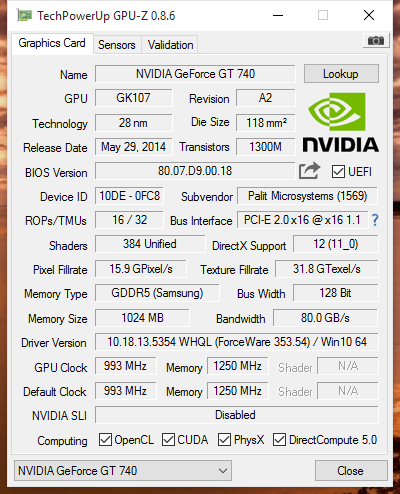
image

Honestly, all you really need to do is grab gpu-z, fire it up, and just click that little icon in the top right corner. It’ll automatically snap a screenshot and upload it for you, then just drop the
Links here.
I find this super handy because it shows the pixel fillrate, which I guess is basically a direct way to see how much "muscle" a card actually has...

I'm especially curious to see a screenshot of that A8 7600 AMD processor everyone keeps raving about. I want to see if it actually hits 5.8 gp/s or whatever it's supposed to be. So, if anyone out there has one, please just post it—it'll take you like two minutes tops...
Running Windows on Ubuntu? in IT Support ·
Drew Allen77 said:What recovery for?

On my machine, I don't even see that stuff, just a 500 MB system partition; everything else is just my own personal space.

Yeah. If you don't want to mess around with manual partitions, just wipe the whole drive until you're left with one big empty block of space and hit "Next." The installer will just handle creating a partition and formatting it all on its own.

Windows XP
•Setup creates only a single Windows partition.
•The Windows Recovery Console is not part of the default installation, but can be easily added to the Windows partition where it gets installed in a directory and takes roughly 7MB of space.
•Only 512-byte native (512n) drives supported. Advanced format (AF) 512-byte emulation (512e) and 4K native ($1.25) drives not supported officially and not recommended.
•No GPT support for booting. XP 64-bit can use GPT drives for data only.

Windows Vista
•Setup creates only a single Windows partition in both BIOS/MBR and UEFI/GPT (for 64-bit only) modes.
•The WinPE-based WinRE made its debut on the Vista DVD but there is no easy way to install it on the hard drive since no installation routine is provided for it. Instead tools and scripts provided as part of WAIK need to be used to do this manually.
•WinRE must be installed on a separate partition from the Vista system partition. Can be combine with BitLocker Drive Encryption (BDE) partition if required.
•Recommended WinRE partition size is around 1GB when it is installed as an expanded image.
•AF 512e drives supported with some updates/hotfixes but AF $1.25 not supported.

Windows 7
•Setup in BIOS/MBR mode creates a 100MB System Reserved partition and a Windows partition. 1
•In early pre-RTM builds (until at least 7057) the System Reserved partition was 200MB in size.
•The System Reserved partition contains boot manager (bootmgr), Boot Configuration Data (BCD) and startup files used for BDE. Can also contain WinRE.
•The System Reserved partition minimum size is 100MB, but it can be larger. It is marked active and must not be encrypted. In BIOS/MBR mode it can be formatted as either FAT32 or NTFS (Setup uses NTFS).
•If WinRE is not installed in the System Reserved partition (for example if the partition is never created because Windows is installed on a pre-partitioned drive), it is installed in %SystemDrive%\Recovery instead.

•AF 512e drives supported with some updates/hotfixes but AF $1.25 not supported.

•Setup in UEFI/GPT mode (for 64-bit only) creates a minimum 100MB EFI System Partition (ESP), a 128MB Microsoft Reserved Partition (MSR) and a Windows partition. 2

•The ESP contains the NTLDR, HAL, Boot.txt, and other files that are needed to boot the system, such as drivers. The MSR is used by the OS for disk management.
•The ESP must be formatted as FAT32.
•Same rules apply for WinRE in UEFI/GPT mode as in BIOS/MBR mode.

Windows 8
•Setup in BIOS/MBR mode creates a minimum 350MB System Reserved partition and a Windows partition. 3
•The System Reserved partition contains WinRE and BDE-related files. In BIOS/MBR mode it can be formatted as either FAT32 or NTFS (Setup uses NTFS).

•AF 512e drives supported in both BIOS/MBR and UEFI/GPT modes.

•Setup in UEFI/GPT mode (for 64-bit only) creates a minimum 300MB WinRE partition, a minimum 100MB EFI System Partition (ESP), a 128MB Microsoft Reserved Partition (MSR) and a Windows partition. 4

•The ESP has gotta be formatted as FAT32. If you're messing with AF $1.25 drives, the ESP needs to be at least 260MB because the math for the FAT32 partition works out to the sector size (4KB) multiplied by 65527, which gives you 256 MB.
•Just a heads up, those AF $1.25 drives only work if you're running in UEFI/GPT mode.

Windows 10 * I mean, this might change before the final RTM release, obviously.
•If you go with the Setup in BIOS/MBR route, it'll set up a 100MB System Reserved partition, the main Windows partition, and a 450MB WinRE partition (though it could be as small as 300MB). 5

•Those AF 512e drives should work fine whether you're using BIOS/MBR or UEFI/GPT modes.

•When you're doing the UEFI/GPT setup (which is just for 64-bit systems, I guess), it builds a 100MB EFI System Partition (ESP), a 128MB Microsoft Reserved Partition (MSR), the Windows partition, and a 450MB WinRE partition (which can be as low as 300MB). 6

•Again, the ESP has to be FAT32. For AF $1.25 drives, the smallest the ESP can be is 260MB since the FAT32 partition size is basically sector size (4KB) times 65527, hitting 256 MB.
•And yeah, AF $1.25 drives are only compatible with UEFI/GPT mode.