Adam Moore3 said:I wouldn't suggest those components unless I was certain they were solid enough 😬 The cases you mentioned are definitely an upgrade—better build quality, nicer aesthetics, and higher-end materials—but they’ll hit your wallet harder too. The Z1 neo comes with three pre-installed fans, so you won't have to worry about overheating, even if the build quality isn't exactly top-tier. If you really want one of the ones you picked, go for it, just keep in mind the price tag will jump. 🙂
I'd personally steer clear of a 27" 1080p monitor. The pixel density is pretty weak, which makes everything look grainy, especially if you're sitting close to the screen. You're better off going with a high-quality 24" instead, like this: KLIK Ideally, the sweet spot would be a 27" 1440p setup, but that's going to cost quite a bit more: KLIK
The real sweet spot is 1440p at 32". Pixel density ends up being pretty much the same as a 23" 1080p.
But let's not jump straight to an expensive monitor. The OP suggested a 1080p 60Hz screen, and you're out here recommending 1440p 144Hz.
You can grab a 32" 1440p 75Hz model for much less cash. I'm using one right now and it's fine. 27" 1440p is for when you need extra detail for work; for gaming? Not necessary.
wanderingbison9 said:Thanks. Where exactly is that located? In Radeon software/display/color depth? Can you snap a photo if you don't mind?
10-bit matters because you can download UHD HDR movies—they look sharper on a WQHD screen compared to FHD versions, plus the color gradients are smoother. MadVR handles the HDR to SDR conversion, and it looks incredible, better than a standard Blu-ray. It's worth it.
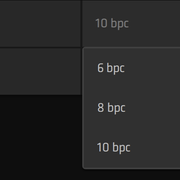
In Windows Settings and under Display in Radeon Settings
Is MadVR some kind of player? If I grab an HDR torrent, can I just watch it in VLC?
wanderingbison9 said:If you want to see those 1.07 billion colors—which is huge for smooth gradients like a clear sky so you don't get that nasty banding—you really need to be running in D3D11 fullscreen exclusive mode on Windows. Not sure how many games actually support that, but HDR movies are 10-bit (easy enough to watch via MadVR even on an SDR screen), and for any serious graphics work, it matters...
P.S: if the panel in the Lenovo is the same one used in the AOC, then we're looking at a TP Vision ADS panel... TP Vision is basically Philips😱
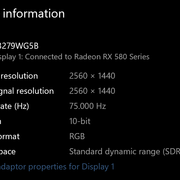
Specs say 10-bit, 75Hz. Still can't tell if I'm actually getting bit depth since the screen isn't HDR.
True, you can pop an SD card in there, but the speeds are basically on par with an HDD. Plus, once you look at the prices, they're getting pretty close to what an SSD costs, so I'm not sure why anyone would bother. Either way, it's going to be slower than any actual SSD you could throw at it.
wanderingbison9 said:Also, I’d like wiredotter14 to see if he can force 10-bit color in the GPU drivers for the AOC monitor (might need to test lower resolutions). I can't get it to work at all on my end (RX580), even though the panel is 10-bit.
I can check once I'm back home, but I'll be out for a few days. For what it's worth, I'm also running an RX580 and using DisplayPort. What does a 10-bit panel actually mean?
Your laptop has one m.2 slot (housing that 128GB SSD) and one 2.5" SATA bay where your HDD lives. You can't shove an HDD into an m.2 slot, so swapping the current SSD for an HDD isn't an option—not that you'd want to kill your speed anyway.
Look, instead of messing with the current drive, just grab a new m.2 SSD like the one in your link. You just have to verify if that m.2 slot supports NVMe or if it's restricted to SATA. If it's SATA, you'll need an m.2 SATA SSD; they look identical to the NVMe ones, but the standard is different.
wanderingbison9 said:The pricier one hits 165 Hz and actually supports High Dynamic Range, whereas the cheap one tops out at 144Hz and just uses some fake software trick for High Dynamic Range. Makes sense—if the budget option does enough for you, why spend more? But the potential is definitely there...
Honestly, I don't think supporting a High Dynamic Range signal matters at all if the actual panel can't handle it. Dude bought it specifically for those 165Hz refresh rates to play Counter-Strike: Global Offensive. 😁 Otherwise, I’d probably go with a Dell.
wanderingbison9 said:Yeah, on paper, plenty of monitors look identical with the same basic specs, but then you realize Dell actually has a better color gamut and all that...
It’s the same deal with those three monitors I mentioned earlier—they claim different things, but they're definitely using the exact same panels...
It's a 165Hz model. From what I can tell, it’s basically an upgraded version of this one:
Both these monitors use the same panel found in that popular Dell, except this model hits 165Hz.
Man is happy with it. Says he's recommending it—didn't realize games could actually look like this. Running Counter-Strike: Global Offensive and Fortnite on a GTX 1650 with high FPS, no issues. G-Sync works from 48-165Hz. If you try searching for the full model name on Amazon, nothing comes up because they messed up the name XV240YPbmiiprx (it's usually just called the Monitor Model)
Bottom line: the monitor is probably nearly identical to that Dell, just 165Hz instead of 144Hz and a year less warranty.
For some reason, Amazon doesn't seem to pick up this specific model. Best Buy has it. It's a bit cheaper at Walmart, supposedly with a 5-year warranty (though the price shifted; it was under $110 before)
Thomas Wells5 said:Thanks for the reply. I cobbled this together at 4 AM without really thinking it through lol. Does it make sense to just grab a standard 3600 without a GPU and toss in some dirt-cheap $50 graphics card just to get a display? I honestly can't wait until next week for my processor to arrive, and since they both have the same core count, I don't see much difference.
Doesn't make sense. The 4650G is basically an identical twin to the 3600, just with an iGPU included. Just grab 2x8GB of 3000 or 3200 MHz DDR4 RAM. Ryzen loves higher frequencies.
What Adam Moore3 put together is solid. That i7 10700 is genuinely a better bet than an unlocked 10600K, and it won't cost you much more than a Ryzen 3700x.
Kenneth Ortiz4 said:Unfortunately, the OP hasn't received a single helpful suggestion here, just people complaining about what isn't an option... plus, apparently, AMD isn't even on their radar.🙂
My bad, I mixed you up with that other guy (Ninzo...). Thought you were the one asking about a motherboard for the Ryzen 5 3600.