The R5 3600 is solid because it finally stepped up to its level—actually, it surpassed it—by matching or even beating Intel frame for frame in average FPS. That said, nothing was really wrong with the R5 1600 either, especially if you weren't chasing high refresh rates; it still delivered plenty of frames for a smooth 60/75Hz experience at a great price point. This 1600 AF version is just a step up since it’s essentially an R5 2600, which makes it a total no-brainer in this scenario... 🙂
Lawrence Phillips said:Where does a second-gen Ryzen 7 fit into this story? Specifically, one that's cheaper than a third-gen Core i5...🤔
It's a solid all-around deal, but if you're strictly gaming, the third generation is still the way to go (better IPC = better single-thread performance) since most games still can't fully tap into all that multi-threaded power an R7 provides.🙂
I honestly don't think you can go wrong with any of these options (Core i5 7600, Core i5 8600, Ryzen 7 2700, Core i5 9600)—every single one is pretty much a best buy in its price bracket. They're spaced out quite evenly, too, so as you put more money down, you're realistically getting a better return on your investment. The Core i5 7600 is likely still the best value here because 6c/12t for $267 is just unbeatable.
I get that you're watching your budget, totally understandable 😁
CLICK - comparison on a 9900K ranging from 2c/4t up to 8c/16t. Looking at this, the jump from 4 to 6 cores seems to be about ~15% in this specific test. Just keep in mind this is moving from 4c/8t, whereas your current setup is just 4c/4t. So, you might actually see upwards of a 20% boost in FPS. It's hard to give an exact number, but based on these results, that's the takeaway.
Honestly, I think it's time to move past quad-core builds. Since prices are actually pretty reasonable right now (and since you're clearly trying to save some cash 😬), I wouldn't wait. Unless you're planning to go all out and grab a high-end Zen 3 chip when they drop, though those will probably be pricey at launch.
A Bottleneck isn't something you can just pin down with a single number. And even if you could, it wouldn't be 20%. I'd say that depending on what you're playing, there's either no Bottleneck at all or it hits around 20% in CPU-heavy titles. That definitely doesn't mean the pairing is bad or a waste of money, though. I'm running a Core i5-4460 myself, and in Battlefield multiplayer, it maxes out at 100%, so the GPU isn't being fully utilized. So does that mean the Core i5-4460 is a Bottleneck and a bad match for a GTX 1060? Do I need at least an i7 for a mid-range card priced around $400? 🙂
crimsonstag84 said:The GPU itself is identical, but the memory isn't. Most 4GB models use Micron chips, which are cheaper and slower. Like anything you try to overclock, you just have to test it yourself. I doubt they'll hit 8Gbps because I know a buddy had 4GB models for mining (Micron chips) and he could barely squeeze out 7.5Gbps.
So they aren't actually the same after all? The GTX 1060 4GB and 8GB versions aren't quite what people usually claim 🙂
Austin Rodriguez5 said:There's no way that processor is causing any Bottleneck. In my experience, only a 1080ti could actually bottleneck a Celeron G456, and that card is miles ahead of a GTX 1060.
I don't know what kind of tests you're looking at, but if you run any CPU-intensive game on a G4560, you're going to deal with massive stuttering while that Celeron struggles to stay alive. 🙂
A Core i5-4460 is definitely much stronger; I'd say the GTX 1060 is a perfect match for it.
Alexander Moore67 said:Core i5-4460 can't handle the GTX 1060...
A GTX 1060 that's 10% weaker? Come on... 🙂
crimsonstag84 said:Since the GTX 1060 is a bit cheaper, I'd probably go with that, but... there’s a catch between the 4GB and 8GB models when it comes to memory speed. The 4GB versions run at 7 Gbps, while the 8GB models hit 8 Gbps. istu It’s the same story with the GTX 1060 models. It's common knowledge that Polaris cards often suffer from insufficient memory bandwidth relative to the GPU. So, even with about 10% more stream processors and slightly higher clock speeds, this GTX 1060 will only end up being 5-10% faster once you get past the VRAM bottleneck.
Everything you said is spot on. Honestly, I’d be right there with you if we were talking about a GTX 1060... $33 It’s more expensive. But let's be real—we're talking about a significantly more powerful card here. A 5-10% difference is still a 5-10% difference, but you're getting way more bang for your buck...
Just as a side note, I'm running a GTX 1060 4GB, so I was wondering if it’s actually possible to bump the memory clock from 1750 MHz up to 2000 MHz? Since it's basically the same card as the 8GB version, does that give me any guarantee it'll actually hit that frequency?
If the price is about the same, the RX 580 is the way to go. I don't see the point in forcing an 8GB card if the actual chip is weaker overall. Sure, you might be able to crank up the texture settings, but you'll lose out on everything else because you're getting lower FPS and worse performance in general. Honestly, 4GB of VRAM is perfectly fine for 1080p.
urbanpilot15 said:They are out of stock - Crucial 16GB Kit ( 2x8GB ) DDR4 3000 MT/s (PC4-24000) so they offered G.Skill Aegis RAM 16GB (2x8) DDR4 3000MHz....... is this swap acceptable?
Yeah, just make sure there isn't a massive price difference.
I’d much rather go with 8GB of RAM for now if it means I can drop the $33 PCI-E ASUS AMD Radeon RX 580 dual OC in right away without going 🙂 over budget. Upgrading the RAM later is a breeze anyway...
urbanpilot15 said:Why does this configuration lack an HDD? Is one actually necessary? I have one running alongside my SSD in my own rig.
What exactly is the problem? Provide some details.
An HDD and an SSD serve the same basic purpose, it's just that an SSD is significantly faster and more responsive. Only a few years ago, a terabyte of SSD storage cost four times as much, making it unthinkable to include that kind of capacity in a high-end build like this.
Right now is actually a great time to pick up a new setup, especially since SSD prices have dropped so much. You definitely won't regret opting for just the SSD—plus, you won't have to deal with that annoying clicking noise from a spinning HDD 🙂 )
Peter Green said:It’s kind of hilarious when someone builds a $2,500 rig and tosses in a 3950x—which basically gives you maybe 7-8% more juice than a 3900x but costs 70% more—only to pair it with a GPU that’s worse or the same as what they already own. 😁 In some editing software, the difference between a GTX 1650 and an RTX 2060 isn't exactly negligible.
He'd mostly be using it for Adobe After Effects and other video/multimedia editing tools.
Spending $3,500 is massive overkill if the investment isn't going to pay itself back, and let's face it, it won't since this is a hobby, not a career. But hey, whatever, everyone knows their own budget and priorities best.
Having 4 extra cores/8 threads makes a much bigger difference than a mere 7-8% once you run applications that actually know how to utilize them. 🙂
Peter Green said:Honestly, I think dropping cash on a 3950x when you could just grab a 3900x is basically throwing money straight into the trash. There is zero chance he’s ever actually going to need that many cores, no matter how much he thinks he does. Instead of wasting that extra budget on overkill CPUs, he should be putting that money toward a better GPU. Like, at the very least, he needs to step up to an RTX 2060.
That is the absolute worst place to sink that extra cash. The performance gap between a Titan and a 1660Ti in Adobe After Effects is barely 15%.
Besides, how can you possibly claim there's 'zero chance he'll ever need that many cores, no matter what'?
A better, larger, faster SSD, a better case, a better motherboard, or even just keeping the money in his pocket—those are all valid moves. Dumping it into a GPU where you won't even notice the difference? Not happening. 🍿
wiredotter14 said:Hold on, the 5820K uses DDR4 too, so you can probably keep your RAM
What RAM are you running right now?
I'm not sure how much of a difference it'll make in After Effects compared to an RX480.
🤦
You just suggested spending nearly $2,500 on 64 GB of RAM. My bad, I wasn't thinking...😵
wiredotter14 said:Hold on, the 5820K uses DDR4 too, so you can probably keep your RAM
What RAM are you running right now?
I'm not sure how much of a difference it'll make in After Effects compared to an RX480.
Based on this, even the best AMD card out there (the 5700XT) can't touch Nvidia's mid-range stuff like the 1660Ti. Honestly, I have no idea if there's any point in switching or how much of a boost he'd actually get.
Best buy is the MSI MAG B450 Tomahawk, so you really don't need to overthink that one.
For the CPU, just go with the Intel Core i5-9600K; it’s honestly not worth dropping extra cash just for a higher boost clock since the performance gap is negligible.
You aren't actually losing anything by sticking with an SSD... nothing at all. Aside from obviously having less storage space. I'm not sure where you're looking, but you can find 1TB SSDs at pretty reasonable prices these days, so maybe consider that option instead.
As for the graphics cards, OVDJE you can find a hierarchical list of Graphics Cards ranked by relative power (based on the RTX Titan), so check that out to see what gives you the best value depending on the prices you find. Personally, I think the 1660Ti is the current sweet spot for 1080p gaming, or maybe the EVGA GeForce RTX 2060—though if you're looking at a 2060, you're getting pretty close to the performance of an RX 5700, which makes the RTX almost pointless.
From what I've gathered, After Effects prefers an Nvidia GPU, but the performance gap between different cards in the lineup is pretty negligible, so there's no real point in overspending on a high-end card.
The motherboard is an entry-level X570, but it's more than capable of handling the 3950X as long as you aren't attempting any extreme overclocking.
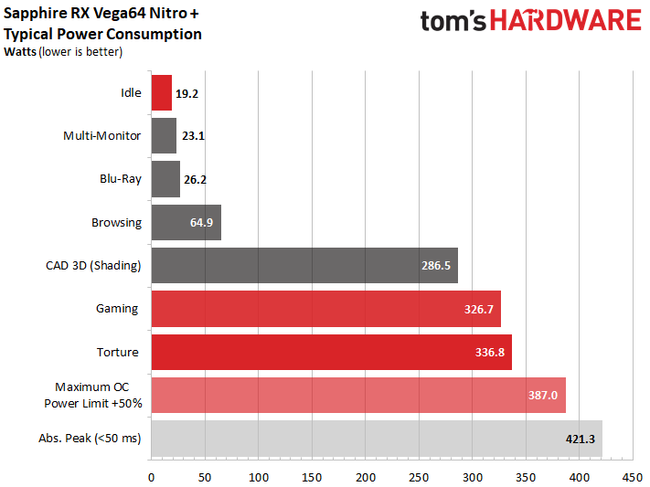
Best V64 deal I've seen yet, top-tier cooler, but... meh... missed the boat on that one. You can grab reference RX 5700 cards for that kind of cash, unless maybe they drop prices or we see another massive Nvidia clearance sale
Also, I'm personally a bit nervous about the PSU, even if it is a high-end Corsair RM550x. I wouldn't push it unless I absolutely had to😬
Pls tell me that's the total system power draw and not just the GPU.
David Hall10 said:The only potential issue is that the RTX 3060 only comes with a 6-month warranty since the supplier already repaired it.
That’s why it’s such a steal. 😁I haven't checked myself, but the warranty is actually 18 months, not 6. Honestly, for that price, I think it's perfectly fine.
darktinker60 said:Thanks. I noticed people are recommending the RX 570 quite a bit too; Best Buy actually has an EVGA GeForce GTX 1060 STRIX for basically the same price right now. Is the GTX 1060 better? Also, can I run a 144Hz monitor (like an Acer Nitro) on these builds?
Nah, the 1060 is noticeably stronger than the RX 570. You'd need an RX 580 to be roughly equivalent to the GTX 1060. They're probably just clearing out old GTX 1060 stock, which is why they're so cheap.
Regarding the monitor, you'll be fine. With a GTX 1060, you can push well over 100 FPS in titles like League or CS:GO, but don't even bother dreaming about getting those kinds of numbers in PUBG (not a chance).