CheckEmoji Community · the emoji forum
🏠 Home 🆕 What's new ❓ Unanswered 🔥 Popular 📡 RSS Members 👥 0 online log in · register
Home › Jack Alvarez › Posts

Posts by Jack Alvarez

245 posts shown.

Dell setup in Desktops ·
You can find everything you need right over at http://www.mylemon.at/ ... since I'm running a 4K TV, having HEVC support is an absolute must-have for me. As for the budget, I don't really have a strict limit set in stone; I'm honestly not quite sure what kind of price tag we're looking at here. It doesn't necessarily need to be some top-tier, high-end monster, but like I mentioned, it needs to be able to handle 4K material without breaking a sweat—especially if I need to encode something because the TV doesn't play nice with a specific AV format.
Dell setup in Desktops ·
Hey everyone, I’m looking for some solid advice on putting together a decent Dell setup for my home theater. I’m torn between just picking up a pre-built machine or if it’s actually worth the effort to custom-build the whole rig myself. The main thing is that I need it to handle streaming 4K content smoothly, so I’m wondering just how much of a heavy lifter the graphics card needs to be in this equation. I’m actually planning to upgrade my Radeon HD 7970 pretty soon, so I was thinking about repurposing it for this HTPC. If I go that route, I’d still need to hunt down a motherboard, a processor, a power supply, and some RAM, though I feel pretty confident about picking out my own case and Hard Drives 😁
My vision is to tuck this little machine away in the basement, hooked directly into the modem, and then networked over to my main desktop upstairs—where I'll do all the heavy lifting of organizing files—and finally to the TV, since everything will be streamed exclusively through a Plex server.
Budget build for $600-$650? in Desktops ·
So, I guess I'll just sit tight and wait for further updates then? Sounds like a plan, thanks for letting me know!
Budget build for $600-$650? in Desktops ·
Thanks so much for all the suggestions, everyone. crimsonstag84, I noticed that the case you recommended doesn't actually have any USB 3.0 ports, which is a bit of a dealbreaker for me, so I think I'll go with the Corsair Carbide Series ATX instead. That way, I can pull everything together into this final build

image
Budget build for $600-$650? in Desktops ·
Hey everyone, hope you're all doing great! I was wondering if anyone might be able to help me out with a little project. If it isn't too much trouble, I'm looking to put together a solid gaming rig with a budget of around $700 at http://www.bestbuy.com/. My goal is really just to get the absolute best bang for my buck—basically, what’s the most powerful setup I can squeeze out of that amount? Thanks so much in advance for any advice you can throw my way! 🙏
Network password issues in IT Support ·
That did the trick! It was acting a bit strange while it was still powered on—the password wouldn't go through for some reason—but I finally managed to get it working once I reset everything. Thanks so much, Tom.
Network password issues in IT Support ·
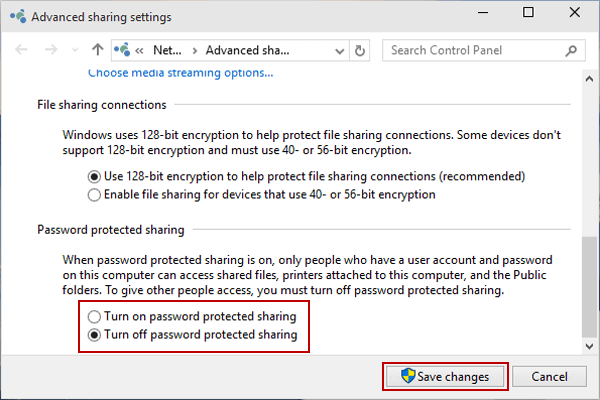
So, I head over to the Network and Sharing Center, click through to the option for changing advanced sharing settings, and then I go ahead and select

image

if that’s what we’re talking about, but even after doing all that, I still can't seem to get into those files.
Network password issues in IT Support ·
My English isn't exactly top-tier, so why don't you go ahead and draft it up? We can take a look together afterward and see if anything gets lost in translation 😁
Network password issues in IT Support ·
And how on earth am I supposed to get my hands on those advanced sorting options?
Network password issues in IT Support ·
Hey everyone, I’ve run into a bit of a snag and was hoping someone might be able to point me in the right direction. I have an external HDD plugged directly into my Netgear Nighthawk router via the USB port, and for the most part, everything seems fine. When I pull up my computer and navigate over to the network drive where the HDD is located, it shows up just like it should. However, I'm hitting a wall when I actually try to interact with it.

image

So, when I go ahead and double-click on my Netgear Nighthawk, everything works exactly how you’d expect—it just opens right up and shows me all the folders sitting on that external HDD, which makes perfect sense to me! 🙄

image

It sounds like you're running into a bit of a roadblock where every time you try to open up a specific folder, the system starts nagging you for a username and a password. It’s definitely one of those little digital speed bumps that can feel pretty annoying when you just want to get things done! Usually, when that happens, it means the folder has password Protected Sharing turned on, or there's just a mismatch in how your computer is recognizing your credentials. You might want to check your network sharing settings to see if you can tweak how the permissions are set up, or maybe double-check that your login info is being accepted correctly by the host machine. 🙂

image

Honestly, I’m completely stumped here because I haven't actually gone in and set up or assigned any kind of information like this myself. It feels like it just popped up out of nowhere, and I'm scratching my head trying to figure out where it came from. If anyone has run into something similar or knows a quick way to get this sorted out, I would truly appreciate the help! 🕺

Quick update on this: When I fire up the TV, everything works like a charm—it picks up the router immediately and streams movies straight from the external HDD without skipping a beat. But for some reason, when I try to get things running on my Desktop-PC, it just refuses to cooperate no matter what I do.
Google Drive account hacked in IT Support ·
Isn't there some kind of setting on that supposedly all-powerful Apple gear that lets you check exactly where and when everything was logged in, kind of like how you can easily track all that stuff on this Google platform?

image
USB mass storage issues in IT Support ·
Give this a shot: head over to the Device Manager Button and expand the Universal Serial bus controllers section. From there, just right-click on every single device listed under Universal Serial bus controllers and select Uninstall to clear them all out. Once you've done that, give your computer a quick restart, then go ahead and install the latest USB drivers from scratch, and hopefully, everything should be running smoothly again!
USB mass storage issues in IT Support ·
Are these chipset drivers still worth installing?
4TB USB 3.0 External Hard Drive in IT Support ·
Honestly, my guess is that he probably sorted everything out the second the issue stopped popping up. I’ve always found those types to be the most amusing—they’ll drop a question in your lap, get exactly what they need, and then just vanish into thin air without a trace.
What if you tried setting up that new router you just picked up as an Access Point instead and see if that does the trick?
Michael Diaz5 said:20 megabits = 2,560 kilobytes = 2.56 MB

20 megabits = 2,560 kilobytes = 2.5 MB
If you take those 2,560 KB and plug them into your chart—or honestly, any standard calculator—you’re going to end up with 2.5 MB, because 2,560 divided by 1,024 equals 2.5, not 2.56.
The whole reason why internet service providers and hard drive manufacturers love to round everything down to 1,000 is really just a clever bit of marketing rather than anything to do with actual data speeds; I mean, anyone who tinkers with tech knows that a single kilobyte is actually 1,024 bytes (or 2 to the power of 10). Marketing departments love to claim that the prefix "kilo" comes from the decimal system representing exactly 1,000... which explains why when you go out and buy a 1TB hard drive from a place like Best Buy, you don't actually see 1,000 GB of usable space, but closer to 931 GB.
You should head over to the Network and Sharing Center, jump into your adapter settings, and go ahead and disable the LAN adapter—and you might want to just shut down the WLAN adapter as well to be safe.
I’d say that answer definitely falls under option A.
What do you mean by defragging? One of my Hard Drives is sitting at 47% fragmentation right now, but honestly, everything is running just fine
4TB USB 3.0 External Hard Drive in IT Support ·
It really all depends on what you're trying to move, because if you’re tackling something like a thousand individual photos, those speeds might actually be pretty standard since that specific Hard Drive is notorious for being sluggish when it comes to random write speeds. You might also want to double-check that you've got the latest USB 3.0 drivers installed, and honestly, the same goes for your chipset drivers too. It’s also worth diving into your BIOS to see if there's an option to manually enable USB 3.0 support, and if the drive happens to be formatted in FAT32, switching it over to NTFS could make a world of difference. To get a better idea of what's actually happening under the hood, try running a quick test with CrystalDiskMark, Drew Allen77, just to see what kind of actual read and write speeds you're getting.