mistybison said:I've already backed everything up in a few different spots so I can roll back if needed, but if the whole system fails to boot, I’d probably have to take it to a repair shop since I’m a total novice and wouldn't know where to start on my own. 😳 😁
Don't listen to the Android; having a disk image is pretty much non-negotiable for anyone who actually uses their computer, and you can handle the backup/restore process in Windows 10 using the built-in tools right here: https://www.windowscentral.com/how-m...kup-windows-10 It’s nothing too crazy, honestly, even someone without a tech background could manage it.
mistybison said:I tend to push off updates for weeks at a time, and they always seem to trigger right when I’m in the middle of something else since I can't just sit there staring at the screen waiting for them to start. I’m always worrying about whether the installation will actually finish or if it’ll just glitch out and force me to haul my computer over to a repair shop. It’s a bit of a headache...
Thanks for putting this tool together. 🙂
If I can find the nerve, I might give it a shot. 😁
You should definitely try it; if you ever need to let a macOS update through, it's pretty easy to just toggle those settings back to enabled, reboot, and you're good to go. That said, before any major update, I always suggest making a full system image on an external drive or a backup disk. You won't need a repair shop if you have a solid backup to restore everything to its original state.
Windows Update can be such a massive headache, especially when you're dealing with business PCs. Since Windows 10 tries to act way smarter than it actually is—often stripping away the basic control a user should have over their own system—I’ve found that using a "wildcard" solution like a Windows Update blocker is honestly one of the most useful tools out there. Believe it or not, it just makes life easier. I also find that performing an offline upgrade using an ISO image to move to a completely new version of the OS is much more reliable and secure than messing around with online incremental updates, where you're never quite sure if the process will actually finish or what might end up broken in the aftermath.
This should clear up everything: https://www.sordum.org/9470/windows-...-blocker-v1-6/ Amen. I honestly just perform an offline upgrade using an ISO image about once a year; it works perfectly for me and keeps all my headaches at bay.
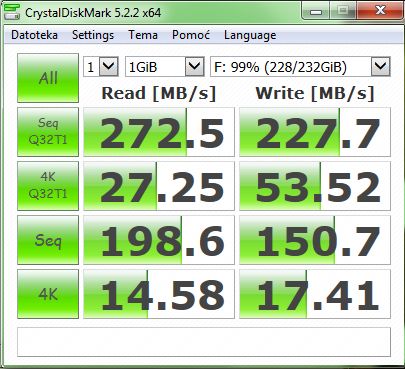
Charles Smith4 said:Check it out, my Crucial MX500 256GB is nearly maxed out, and the numbers look pretty impressive:
Those "great" numbers are a bit of a devil's bargain; true speed is really just a mix of sequential and random performance, and since your random speeds are hovering around 15 MB/s while sequential hits about 200 MB/s, you're likely looking at that realistic average of 50-100 MB/s I mentioned before. Also, while CrystalDiskMark is fine for an SSD, it tends to give flashier results for USB sticks because with a tiny 1 GB sample size like yours, it fails to catch those sudden speed drops that happen once the cache runs out—some brands, like Transcend, suffer from this and tend to inflate their speed claims. If you want the truth, try copying a file larger than 10 GB from an SSD onto the USB stick and watch the speed graph in the macOS file explorer; you'll see the actual dips, revealing a real-world average that’s usually much lower than what the manufacturers promise.
swiftowl7 said:I’d argue that downgrading to Windows XP back in 2020 was already pushing it.😉 Modern Windows versions feel like they were programmed on a coffee roaster.
It doesn't seem like a boot issue since the machine boots, installs, and runs just fine; rather, it's the Windows environment itself that triggers that black screen crash.
I’ve shared some observations based on my own experience—sure, the HDD might be shot, but that isn't how a computer behaves when a drive fails; there's no way a BIOS would react to a failing HDD by making Windows crash like this.😁 🙂
The issue lies with Windows or the drivers, not the HDD, which explains why the system resets. As I mentioned before, it happens to me while using Mozilla Firefox... I can browse all day without an issue, or sometimes it restarts after five minutes, or maybe after a few hours, depending on its mood. You're just browsing normally when suddenly—bam—black screen and motherboard beeps.
When I switch over to Chrome, though... no issues at all, not a single reset.
The issue isn't really that Windows XP has stopped evolving; it's that modern applications either don't work right on it or won't run at all, effectively making the OS useless. You run into codec issues, websites demanding modern standards, a total lack of drivers for newer hardware, and zero support because 90% of the American IT industry considers XP completely obsolete. You won't find updated antivirus software or any other critical tools for it anymore. In short, its time has passed; its only real use now is running old legacy programs inside a virtual machine.
Regarding that disk with an 11% health rating from the SMART tests, it's basically trash. It’s all been said before (maybe read a little more closely), and the author even noted the drive has thousands of bad sectors. Just swap it out for a new one—preferably an SSD—and the problem should be solved.
Honestly, any USB drive claiming more than 128 GB feels a little sketchy to me, mostly because you often run into those fake MBR setups designed to trick you into thinking the capacity is much higher than it actually is. Even the advertised speeds are usually a total lie; in my experience, they rarely break 50-100 MB/s—and writing speeds are typically even worse—even if they claim to be USB 3.0. If you actually bother to run a real benchmark test, you'll see the truth pretty quickly.
Honestly, seeing Windows XP or even MS-DOS feels like a total blast from the past—it’s not even the 90s anymore, for crying out loud. I still occasionally spin up Windows XP or MS-DOS in a virtual machine just for the nostalgia, though I wouldn't dream of running them on actual hardware.
The issue here seems to be that the BIOS isn't consistently picking up the HDD during the boot sequence, so it skips straight to the network card, which isn't connected, leading to that error since there's nothing to boot from. It might be worth checking the health of the drive using some SMART tests: https://hddscan.com/
It’s a progressive thriller that leans into mystery and horror, building toward a pretty dramatic finale underscored by a haunting score. Some unknown forces on an island start driving a fisherman and his son to the edge, leading to some rather grim consequences... I'd give it a 7/10.
It’s probably not going to work out. Even if those RAM modules physically fit the slots and match the type, the speed difference is just too wide (666 vs 1333). I’ve run into situations before where a motherboard or BIOS refused to recognize DDR3-1333 even though it supported DDR3-1066, much like when I dealt with DDR3-1333 versus DDR3-1666 on a different board. Long story short, you're likely out of luck; while the CPU might theoretically try to downclock the RAM, the chipset and BIOS ultimately hold all the cards. If the modules aren't compatible, you're usually looking at nothing but a black screen or a series of BIOS POST alarms.
This is a dark comedy that’s gained a bit of a cult following here in the States, featuring Michael Caine in one of his sharper roles. After a freak accident on the subway, a deputy manager gets a rather brilliant idea about how to efficiently dispose of his wife, followed by his entire office competition. I'd give it an 8/10; it's worth a watch.
It’s only a couple of dollars more, so the price is basically the same. In my experience, Western Digital or Toshiba are usually better bets than Seagate. You can also forget that myth about 7200 rpm drives having shorter lifespans. I personally don't buy anything under 7200 rpm; you can actually feel the performance difference once you run some benchmark tests and see for yourself.
Based on the specs, that NAS seems decent enough, especially since those Seagate IronWolf drives are PMR, which makes them a solid fit for a NAS setup. However, if you're looking at the same price point, you can actually find a better deal over at Western Digital because their X300 is noticeably faster with that 7200 rpm spindle speed, not to mention it comes with double the buffer at 128 MB:
Is there actually any point to this whole hard drive "mining" thing? I can't help but wonder what the monthly take would look like for a little 140 TB Farmati setup like that.
Ryan Gonzalez4 said:I don't really care about the OS and I'm not going the SSD route; I'm sticking strictly to 7200 RPM Hard Drives. I'm just trying to figure out which setup makes more sense. So, are you suggesting an M.2 card for what I've got here?
If you're planning on running nothing but Hard Drive Corp units, then you probably don't need to bother with an M.2 adapter. Honestly, modern SATA3 Hard Drives usually top out at around 200 MB/s for sequential read/write speeds, so a PCIe card—which handles up to 600 MB/s under the SATA3 standard—is already three times faster than what those drives can actually pull. Besides, how many free SATA ports are left on your motherboard? Surely they aren't all taken up, since most boards come with at least four.
Option 2 definitely wins on pure speed—we’re looking at 1700 MB/s compared to just 600 MB/s with option one. That said, for your day-to-day tasks, you probably won't actually feel the difference unless you're moving massive amounts of data around. Both setups have one rather annoying catch, though: since these SSDs are running through adapters or PCIe cards instead of plugging directly into the motherboard, most BIOS versions won't let you use them as boot drives, so they'll just act as extra storage.
Since we're talking about Bronson, he’s actually got a decent following here in the States. I’d say 10 to Midnight (1983) fits this topic much better; even if it lacks some traditional horror elements, it makes up for it with plenty of female victims and blood up to your knees. It’s definitely a gritty, tough flick—the kind of movie they just don't make anymore:
It's basically Bronson taking on a psychopath who lures in women, but the guy makes a fatal mistake when he picks the wrong daughter. I'd give it an 8/10.
Jack Cook7 said:Two EMTs stumble onto some pretty heavy cases involving a new synthetic drug. It's a solid thriller—I'd give it a 7/10.[/I]
The movie is Sci-Fi.
Pretty good.
There’s definitely a Sci-Fi component, but at its core, it feels more like a thriller with horror elements sprinkled in. If I had to pick out the horror bits, I'd point to that opening drug scene, the discovery of the first victim's remains under the elevator, and that whole return sequence.
urbanheron4 said:I disagree. It isn't fantasy at all. This is a straight-up mystery thriller. It kicks off as a neo-noir and then slowly morphs into horror by the end. Sure, there’s a surreal element involving the devil and a voodoo Dance, but that just makes it a horror flick, not fantasy. You could argue every horror movie is fantasy if you look at it that way. Personally, I actually prefer that most of the scares come from more grounded, realistic ways rather than relying on some made-up monster.
Lisa Bonet voodoo Dance
I agree, that’s a spot-on description. At its core, this is a thriller with heavy horror undertones, while the Sci-Fi aspects are pretty much just background noise. I can see how someone who only caught the trailer might get a different impression.