Man, I’m honestly losing my mind just looking at the price tag on this $567😁 I’ve been stuck in this endless loop of reading reviews and specs for months now, trying to figure out what actually makes sense to buy. Last night, I had this crazy dream where I was right in the middle of a Battlefield match in the heat of the action, and suddenly I see this HUD element showing me how low my FPS was dropping. It felt like some weird cosmic sign telling me that I’ve officially burned out and I need to just pull the trigger on an upgrade so I can finally relax and stop stressing about it. 😁 I seriously don't know how you guys deal with all this tension without losing it:klap:
Man, I think I'm just gonna pull the trigger on this 1060, sign up for that account like you suggested, and call it a day. That sounds like a solid plan to me. Look, I’m really not some hardcore pro gamer with a massive list of demands. I’m actually placing my order tonight, so in a few days, I'll make sure to drop some photos right here in the thread, just so nobody thinks I'm just hanging around here being a nuisance without actually buying anything. 😁
Hey, it's me again😁 Sorry I haven't checked in for a bit, but I’m back because I seriously need to pick your brains one more time. So, right before I was settling on that GTX 1050 Ti you guys suggested, I hit a little jackpot, and now I’ve got $567 sitting in my pocket. Now I have a bit of a "problem"—which one should I actually grab? I'll be the first to admit, I'm not exactly a genius when it comes to this stuff🤔 Looking at what I can afford, I found these two cards over on CNN... https://www.cnn.com/graphics-card...m_medium=click https://www.cnn.com/gigabyte-video...m_medium=click
They're basically the same price. I was originally leaning toward the GeForce GTX 1060 3, but then I stumbled upon this other one😁 I'm planning to pull the trigger tonight as soon as I get home from work. My budget started out at maybe $100, then bumped up to $120, and now suddenly I'm looking at $170—so there we go. I really don't want to go any higher than that, and honestly, I can't. Thanks for bearing with me and sorry for being such a pain😁
So, is this the one? I noticed some versions have dual fans while this one just has a single fan. I think I'll just pull the trigger on this one then. Thanks for the help, everyone!👍 https://www.cnn.com/msi-video-card...m_medium=click
Timothy Kim60 said:I mean, obviously go with the new GTX 1050 Ti. You’re looking at a full 3-year warranty, it pulls way less power from the wall, and let's be real, the R9 380 isn't even hitting those speeds anymore.
This one is a much better deal for you.
Thanks for jumping in with the helpful info.👍 But wait, the one you suggested only has 2 GB, while the ones above have 4 GB. Isn't it worth grabbing the 4 GB version? At least from what I can see on that link.
I've got a Gigabyte Radeon R9 380 G1 Gaming sitting here with about two years of warranty left on it, asking $367. Check out the listing here: http://www.ebay.com/itm/graphics-card-listing
Thanks, man, that’s a solid 100 bucks right there, definitely helps ease the sting a bit.😁👍 If I could just land a win on $267, I’d probably throw in some extra cash and finally grab a new GPU for $500, since I already managed to score the rest of the components. Cheers!🙂
Hey everyone. Could I get a little help with an estimate here? I've got 4+2 GB of Adata DDR3 1333 RAM. Running an AMD Athlon x4 760 K. graphics r7 260. Got an R7 260X for the GPU. Motherboard is an ASRock FM2A78M+HD+.
Andrew Peterson2 said:Maybe try booting up in safe mode? I think you just hold down the F6 key... honestly, I can't remember for sure since I'm typing this out on my phone...
Alright, it worked! It’s finally stopped rebooting on me. Seriously, thanks so much for taking the time to help out and getting back to me quickly.👍 Now comes the fun part—hunting down all these drivers. Honestly, that’s going to be the biggest headache of the whole process.😵😁
Andrew Peterson2 said:Go ahead and post some screenshots of what’s going on. First things first, though—try grabbing all those latest updates... maybe they finally fixed the bug in this version.
Sent from my ASUS_Z00AD via Tapatalk
So, I finally tracked down how to kill that error, but there's a catch—my PC keeps rebooting instantly, so I haven't had a chance to actually implement the fix yet. I'm planning to just wipe the slate clean, reinstall Windows 10, and knock this out right away. Honestly, I'm kind of looking forward to it. 😁 https://websetnet.com/hr/threadstuck...or-windows-10/
So, I finally bit the bullet and did a clean install of Windows 10 via a USB drive, and hey, at least the internet is actually working now. But ugh, here’s the kicker—now I’m getting hit with this "stuck in device driver error" message. It's a total mess. I'm thinking about grabbing Advanced SystemCare to see if that can somehow smooth things over, but man, this thing is driving me nuts; it keeps rebooting my PC every thirty minutes because of that error.
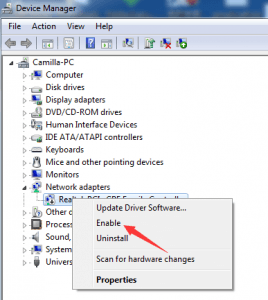
Andrew Peterson2 said:Check your Device Manager first just to make sure nothing got disabled by mistake, It’s possible you don’t even have Realtek—maybe it’s listed under some other name entirely.
If that doesn't do the trick, you might want to try reinstalling the drivers for that network card... sometimes that fixes whatever got messed up in the process.
And honestly, if all else fails, the nuclear option is just to reinstall Windows. Go into the recovery menu and reset everything back to factory settings. It might give you an option to keep your files and just reset the configurations, but seriously... just back everything up first. Better safe than sorry.
Thanks for getting back to me. I checked the first thing and it’s enabled, looks fine, and says it’s running the latest drivers—if I’m remembering the screen right. I also ran that program you mentioned; it claimed to fix 2000 errors and said everything was good to go. The PC seems totally normal otherwise, except for the fact that I have zero internet access. If I go through with that recovery and reset to factory settings, will I need a Windows installation disc or something? And does it wipe the whole computer or just the C drive? I’ve got a ton of stuff on my D drive that I really don't want to lose—photos, movies, you name it. My external hard drive is actually in the shop right now, so I'm kind of stuck. Sorry if these sound like dumb questions, I'm really out of my depth here. Regarding those network adapter drivers, do I just Google whatever shows up on my screen like you did in your picture? I'd have to download them on my phone and then transfer them over to the PC.
I’m just gonna toss this here instead of starting a whole new thread. So, I decided to scrub my PC with an adware cleaner, right? It ended up flagging 84 different errors, which sounded pretty intense. I went ahead and did a full system reset thinking that would fix everything, and honestly, the computer seems to be running fine now, except for one massive problem: I have zero internet access. I'm plugged directly into the router via Ethernet, but there's just nothing. There's this annoying little red X sitting right there on my desktop icon. Has anyone dealt with this before? Any idea how I can get back online?
I was right there in the thick of it on the stands back in those days. I remember one time our ride to New York City totally fell through, and this persistent buddy of mine kept badgering me to just hitchhike. I shot him down immediately—after getting stranded halfway to St. Louis during a rivalry game once, I was officially done with hitchhiking. Anyway, he went off on his own, decked out in his Kansas City Chiefs scarf. He told me later that they snatched it off him almost instantly. They targeted him multiple times during that derby. Since he’s a little "slow on the uptake," 😁 he spent the whole day wandering around New York City, just drinking and drifting. He claimed he got jumped about 13 different times. 🤔 The first couple of times he actually tried to run, but eventually, he just got tired of the cardio and would stand his ground, and honestly, a few times he even practically invited it. 🤣 By the end of it, he was bruised from head to toe and looking pretty "refreshed." For him, the whole thing was such a rush that he kept circling back for more beer and more beatings :klap: The funniest part? Even after taking all that punishment, he still insisted the Boys were harmless. 😁 It wasn't until later, when the video footage came out, that they realized he had several broken bones—which, of course, he didn't feel until the booze finally wore off. His absolute favorite matchup. 😁
Man, I can still vividly picture those massive derby matches where the entire North Stand would just erupt in pure chaos. You guys looked absolutely insane, and the atmosphere was on a whole different level—just legendary. Every single inch of the upper and lower sections would be packed tight, people surging back and forth in rhythm to those "Real Madrid, Real Madrid" chants 👍 sretno, and I truly hope God lets us all experience a packed house and that kind of electric energy again soon!
So, I've got my PC hooked up to an LG 671V monitor—it's about a 42-inch screen—running at a standard 1080p resolution. But here's the kicker: it feels like that CCC driver isn't actually installed or something. I've been spiraling down a rabbit hole since this morning, scouring the web and searching everywhere, but I am completely lost on where the heck I'm supposed to go to actually download it.😵
I figured I’d just drop a quick question here instead of cluttering up the boards with a whole new thread. So, I just finished installing Windows 7, and then I ran DriverPack Solution from a USB stick to get everything sorted. For the most part, things seem totally fine and the PC is running smooth, but there are these two weird glitches driving me nuts. First off, whenever I’m browsing the web and scrolling through text, these random lines start flickering right in the middle of the screen. Then, there’s the taskbar—for some reason, the icons and the clock at the bottom aren't showing up properly; they're basically cut off. I’ll attach a screenshot at the end so you guys can see what I mean. I asked a buddy of mine about it, and he’s convinced it’s a driver issue. I actually tried using the AMD auto-detect tool, and it keeps telling me that I’ve already got the latest driver installed. Everything else is working perfectly, but these two little hiccups are stuck. Does anyone know which specific driver I should be hunting for? Here’s the pic...
So, I figured I’d jump back in here and give you guys my two cents on how things are running. Honestly? FIFA feels way smoother now, the colors seem more vibrant, and there's just way less noise—it's actually a really pleasant experience. I'm having a blast playing lately.🙂It makes me wonder what kind of crazy performance I'd get if I stepped up to an even beefier rig.😁Long story short, this card was a total home run for me! 👏