Look, if I were in his shoes, I’d just wipe the whole thing and pull the trigger on a fresh Windows install. If the issue stays gone after that, there’s a massive chance the culprit was just some messy drivers or—God knows what else—some random junk software (because honestly, who knows what kind of bloat is sitting on that machine right now?). But, if the problem keeps popping up, I'd run a full benchmark and stress test on every single component first, then decide my next move based on those results.
But hey, that's just my two cents...
Ideally, if he understands how PCs work even a little bit—and actually knows his way around some Troubleshooting—he should crack open Task Manager to see if anything looks sketchy... you know, checking out the startup programs, active processes, registry entries, and all that good stuff.
darkcyclist92 said:Oh, let me assure you, I have zero intention of doing that. 😁
Wipe the C: drive and just move forward with a fresh Windows XP installation? "I doubt it."😉 Hmm, I'm not entirely sure if he's really a "dear friend" if he hasn't shown up yet. 😛
Look, anything could be causing this, but based strictly on your description, we are likely looking at either a loose connection with the graphics card, a failing power supply, a faulty RAM seating, or perhaps a bad contact on the boot HDD.
I strongly suggest cleaning the contacts of all these devices using a dedicated solvent—ideally a specialized electronic contact cleaner spray, WD-40, or even some gasoline. You need to pull every single cable out, clean them thoroughly, and then plug them back in, including both the data cables and the power leads. It might seem a bit excessive, but it is a thorough, long-term solution that pays off. This cleaning process should include the PSU pins, the main jack, and all other connectors.
PS: A reinstallation is unlikely to fix hardware instability, though when dealing with Windows 10, you truly never know...
🤦
Look, if you absolutely have to clean them, stick to something like 99% isopropyl alcohol.
darkcyclist92 said:Windows XP is, as of this very second, the absolute core, fundamental backbone of the entire backend infrastructure for a long line of highly prestigious and most successful companies in our country—companies that refuse to gamble on Microsoft's erratic whims. Just look at the facts: I doubt there is a single retail point of sale out there that doesn't run on XP. Do you honestly believe that just because some tiny little program uses XP, it's nothing more than a piece of junk? Is that really your logic?
The truth is, new versions of Windows aren't even necessary unless you are looking to completely wreck your systems and disrupt your business operations. 🙂 Hah, it's not a joke, it's a reality.
Even in my own firm until recently, the entire technical and business side ran on XP. Windows 10 was relegated to a single machine used solely for format conversions that wouldn't run on XP—like h.265/HEVC, for instance—and maybe updating Garmin maps, and that was it.
Therefore, the statement above of yours is such a massive lie that it couldn't possibly be any larger. Even though insight regarding XP isn't even the topic here, fine.
So why don't you play around with such garbage in your garages, plugging in Chinese diagnostic tools and pretending to be some kind of file wizards or whatever... just don't force these outdated systems onto children; you aren't doing them any favors. Those who are actually drawn to technology will find their own ways to have fun, whereas for the majority, computers are just black boxes—tools meant to perform a job they want done... most people haven't even performed a shutdown in months...
Now, taking the facts from the paragraph above into account, I suspect that mastering Windows XP will require significantly more than just installing some cheap Chinese diagnostic software.
Let's be realistic: what is Windows 10? It's an OS for kids. Look at the attempts to follow trends, specifically with Android, which people went crazy for during the smartphone evolution, where they tried to pivot the situation with Windows 10 systems on Nokia smartphones. They even have their own "Windows Store," which has been obsolete on Nokia for a year already. And this "new" system!
Microsoft is well aware that they solved the core systems issues with Windows 2000 NT Server, XP, and Linux back in 2005, and they have held that ground through today and likely well into the future beyond 2022. All this tinkering with fancy cosmetics (GUI) and games for the casual mass market—starting with the failed Windows Vista—is probably all Microsoft does just to prevent desktop computing from migrating entirely to Android. Because the reality is that the gaming industry doesn't just keep the Windows OS alive; it keeps the entire desktop PC industry on its feet. And then there are those fancy internet browsers; otherwise, many businesses would have already shuttered their doors.
But for anything serious, Windows 10? No, absolutely not. 🙂
What kind of "highly reputable and successful companies" are we even talking about here? You gotta be more specific—are we talking about the blue-chip giants like Apple and Microsoft, or those massive conglomerates like ExxonMobil and Walmart that basically run everything? Give me a direction so I don't have to guess.
darkcyclist92 said:Windows XP is, as of this very second, the absolute core, fundamental backbone of the entire backend infrastructure for a long line of highly prestigious and most successful companies in our country—companies that refuse to gamble on Microsoft's erratic whims. Just look at the facts: I doubt there is a single retail point of sale out there that doesn't run on XP. Do you honestly believe that just because some tiny little program uses XP, it's nothing more than a piece of junk? Is that really your logic?
The truth is, new versions of Windows aren't even necessary unless you are looking to completely wreck your systems and disrupt your business operations. 🙂 Hah, it's not a joke, it's a reality.
Even in my own firm until recently, the entire technical and business side ran on XP. Windows 10 was relegated to a single machine used solely for format conversions that wouldn't run on XP—like h.265/HEVC, for instance—and maybe updating Garmin maps, and that was it.
Therefore, the statement above of yours is such a massive lie that it couldn't possibly be any larger. Even though insight regarding XP isn't even the topic here, fine.
So why don't you play around with such garbage in your garages, plugging in Chinese diagnostic tools and pretending to be some kind of file wizards or whatever... just don't force these outdated systems onto children; you aren't doing them any favors. Those who are actually drawn to technology will find their own ways to have fun, whereas for the majority, computers are just black boxes—tools meant to perform a job they want done... most people haven't even performed a shutdown in months...
Now, taking the facts from the paragraph above into account, I suspect that mastering Windows XP will require significantly more than just installing some cheap Chinese diagnostic software.
Let's be realistic: what is Windows 10? It's an OS for kids. Look at the attempts to follow trends, specifically with Android, which people went crazy for during the smartphone evolution, where they tried to pivot the situation with Windows 10 systems on Nokia smartphones. They even have their own "Windows Store," which has been obsolete on Nokia for a year already. And this "new" system!
Microsoft is well aware that they solved the core systems issues with Windows 2000 NT Server, XP, and Linux back in 2005, and they have held that ground through today and likely well into the future beyond 2022. All this tinkering with fancy cosmetics (GUI) and games for the casual mass market—starting with the failed Windows Vista—is probably all Microsoft does just to prevent desktop computing from migrating entirely to Android. Because the reality is that the gaming industry doesn't just keep the Windows OS alive; it keeps the entire desktop PC industry on its feet. And then there are those fancy internet browsers; otherwise, many businesses would have already shuttered their doors.
But for anything serious, Windows 10? No, absolutely not. 🙂
I’m honestly just dying to know how people at my old firm had the absolute nerve—like, where do you even find that kind of audacity?—to be running an HMI on a ten-million-dollar machine using Windows 7 instead of upgrading to Windows 10. 🤔
Man, I am so done with these ancient laptops and Windows XP machines—it’s honestly pathetic. Just give the kid a decent modern computer or a real laptop running a recent version of Windows...
With the way computer science is taught in schools these days—which, let's be real, is basically just an optional elective LOL—a kid using this prehistoric Abacus of a laptop is going to end up digitally illiterate. Which, coincidentally, describes about 90% of the people hanging out on this forum anyway.
People can't even find basic info online, they struggle to follow simple four-step instructions to connect two devices, and don't even get me started on the fact that half of them don't even know the difference between RAM and a hard drive...
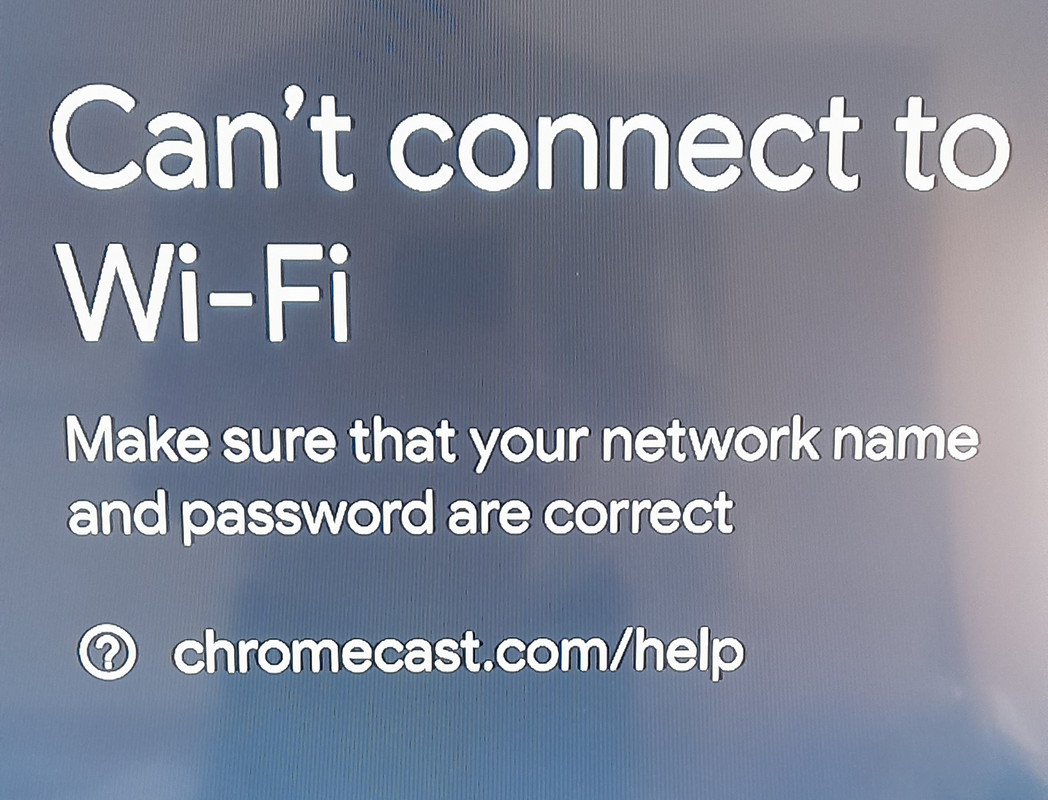
Morgan Ortiz6 said:So, I was trying to get my phone hooked up to the TV. I picked up an Apple AirPlay, followed the manual to a T, and plugged everything into the HDMI and USB ports on my smart TV. On my phone, I went ahead and downloaded "TV Cast for Apple AirPlay." Then, I grabbed the remote, switched the source to that specific HDMI input, and this message pops up on the screen: I tried doing the exact same thing on a different TV, and yeah, same result. The weird part? Nowhere in the instructions does it say anything about needing to connect the TV to the WiFi. Does anyone have a clue what I'm missing here?
It’s pretty obvious what the issue is. You basically answered your own question in the post. For any of this junk to actually work, you need to be connected to the internet.
What you need to get started An Apple AirPlay device (3rd gen or older). The latest version of the Amazon Alexa App. The latest version of the Google app. A Google Account. A display device with an HDMI input, like a high-def TV. A phone or tablet. A compatible phone or tablet—you'll need one that supports 5 GHz if you're trying to set up Apple AirPlay on a 5 GHz connection. Just a heads up: WPA2-Enterprise networks won't work. Make sure your device meets the minimum Operating system requirements to run the Amazon Alexa App. An internet connection. Access to a secure wireless network. Better have your WiFi password ready. Availability and performance of certain features, services and applications are device- and network-dependent, and might not be available in all areas. Subscriptions might be needed, and extra terms, conditions, or fees could apply.
wearybison63 said:I suppose I should offer a word of praise for Reddit lately. It’s been a refreshing change of pace to see us avoiding those constant 503 and 504 errors that used to plague the site. Furthermore, I find myself somewhat surprised—though perhaps not entirely—to have been appointed as a moderator. 👍
I’ve said it a dozen times already, but I’ll say it again just so it sinks in. If you’re still rocking a PC in 2022 with your OS running off an HDD... man, my heart goes out to you.
Seriously, whether that old drive is actually working or not, just grab an SSD and get moving...
Look, I’m not saying we need some high-level oversight or whatever, but there are these specific guys who just relentlessly troll and belittle people in certain threads—and they aren't even hiding it, doing it openly from clone accounts...
And then, the classic move: a new thread pops up, one of the regulars shows up, and the troll immediately jumps in to start the exact same drama and bickering all over again. It’s infuriating because it drags on for 4 or 5 pages straight... and absolutely nothing happens. No intervention, nothing.
But hey, clearly nothing is going to change around here. I've decided to stop checking the boards so often and just tune out most of the threads, so... yeah, whatever.