Around $0.77 seems pretty fair compared to the pre-built setups we see here in the States, especially if those Windows licenses are legit (I never quite get how you guys handle licensing, but in the US, getting legal software for budget rigs can really drive the price up...) So, looking at this through the lens of buying a pre-built, you know you're playing a bit of a gamble. In this price bracket, if it isn't explicitly listed, you can basically assume everything else—like the RAM or the PSU—is total junk. That said, we're talking about an office PC meant for basic tasks. Calling the integrated UHD 610 "graphics" is a massive stretch when it comes to gaming. Everything here is sitting right on the edge of being obsolete, so future upgrades? Yeah, probably not happening.
In my book, the much better move is going with the R3200G. It’s maybe only about $10 ($21??) more than the R3-3200G, but it actually has graphics you can work with and 16GB of RAM. It doesn't come with Windows, but you can easily grab a key on eBay for like $4 or $5, and then just pray the PSU isn't complete garbage...
If this is for kids, I’d honestly lean toward a custom build with some actual headroom. Kids grow fast, and their demands grow even faster. You want a solid foundation: a decent motherboard, a reliable power supply, plenty of RAM... that way, tossing in a used graphics card later actually turns it into a real machine.
If you're stuck with no one to help you build one and you absolutely have to go pre-built, I’m picking the 3200G every time. It’s a much better starting point, and for such a tiny price difference, you're getting way more bang for your buck.
If we want to see any real performance gains, we've gotta convince people to ditch those old system HDDs for an SSD, stop running three different antivirus programs at once, and quit downloading those sketchy "free software bundles" from pirate sites—you know, like installing a massive Microsoft Office Enterprise All-in-One suite when they really just need to type a quick note in Notepad...
Honestly, this feels like back in the day when we were all fighting to shove the kernel into upper memory blocks in MS-DOS 5.1. Back then, you were a total legend if you could manage to clear more than 640 KB of free space... and it actually mattered if you wanted to squeeze in a tiny resident utility that did something useful. Nowadays? Nobody cares about optimization. Software just bloats like crazy, and trying to fight those windmills for some tiny bit of performance that'll just get crushed by the first heavy app you launch is a total Sisyphus move...
So just relax, everyone. Tech has never been this accessible, or the hardware hasn't been this fast and affordable... Just use your computers to actually do something productive instead of spending all your time just making sure the computer is running... A PC has replaced the shovel in the modern world; stop obsessing over the shape of the handle and just start digging...
Honestly, the easiest move is just to do a fresh install. But here’s the trick: when you hit that screen asking which partition you want to use, don't just settle for the default. Instead, use the Delete button to wipe out every single existing partition. If I remember correctly, Linux usually creates at least two—root and swap—so you want to clear those out until you're left with nothing but one big chunk of unallocated space, then select that. The whole idea is to scrub everything related to Linux off the drive. If you aren't planning on using it anyway, why let it hang around? If you wipe it completely, it won't even show up as an option in your boot manager. Here's the deal: Linux is actually pretty polite; it recognizes other operating systems and "respects" them (meaning it knows how to work alongside them). Windows, on the other hand, is a bit more selfish—it mostly just cares about itself. Since Linux was around first with its own boot manager, it basically took over the driver's seat. By deleting those partitions, you're clearing the slate so you can have a totally clean start with Windows... If you've got a digital Windows license, it should automatically activate once the installation is finished (just double-check that, though...).
Michael Jackson10 says: Haven't had the time until now, but here it is. At least, this is my shorter version:
c=0 istaslova="" word=input("Enter first word: ") word2=input("Enter second word: ") for i in range(len(word)): --if istaslova.count(word)<min(word.count(word), word2.count(word)): ----istaslova=istaslova+word ----c=c+1
print("Common letters for the words are:",istaslova) print("Total count:",c)
My previous attempt using find() was a complete bust. You'd have to manage some kind of pointer to track where you are in the words...
Anyway, isn't this decent for someone who's only had about 4 hours of Python classes with a nephew in middle school? Wait until you see me struggle with Turtle 🤣 The Syntax trips me up. I've got one tab open with a W3Schools reference and another on Replit, but Python is actually pretty good for learning logic. You can interpret it instantly or drop in code to check variable states. The indentation-only structure is a pain, and I'm constantly checking casting since nothing is declared—I'm never sure what a function accepts or if I just messed up the Syntax... damn, my last "masterpiece" was in Cleveland... 🤦
Besides, you didn't even define the task right in your first post. It wasn't "how many identical letters they have" (since that ignores repeats: "aaaa" and "aaa" only share one unique letter), it's a "common subset" (where you treat every single letter as its own entity regardless of shape)
Man, we should start a new thread for coding challenges. We could post problems and try to hunt down solutions online, though people would probably accuse us of being "intellectually dishonest" or whatever. Is there anyone here doing actual "coding" who isn't intellectually dishonest, or are we just going to play around with Syntax errors?
Is there a thread for problem-solving? Not just Syntax, but actual discussion on how things should be done?
Sorry, I didn't quite catch that: are you implying I just ripped this off the internet? I told you I was following a tutorial and some W3C reference while using an online interpreter—I wasn't looking for a shortcut... So go ahead, hit me with a link to the "original."
For me, this was just a fun little challenge since I had to wrap my head around Python basics to help out my nephew. It's not like I'm planning on making a career out of it; I'm already pulling 9-10 hour shifts in a totally different industry...
Look, let’s be real: you aren't making much money just selling the actual PC. The real profit comes from the maintenance side of things. This whole thing feels like a new way to squeeze extra cash out of people through "preventative maintenance" tied directly to the sale. They're probably playing on that psychological trigger—that feeling of vulnerability once those first 5 years are up. But honestly? I find it hard to believe a regular person would actually pay for an extended warranty just to "protect" their initial investment of $200 against some random $0.70 issues with the build. That’s definitely the budget-conscious side of the market talking, where every single dollar counts before you even spend it. So, in that specific niche, this extended warranty is nothing more than a clever marketing gimmick and a psychological play. Maybe it works for higher-end builds where parts are insanely expensive, but for most? It's just noise.
I haven't had a spare second until now, but here it is—at least my version is a bit shorter:
c=0 istaslova="" word=input("Enter first word: ") word2=input("Enter second word: ") for i in range(len(word)): --if istaslova.count(word)<min(word.count(word), word2.count(word)): ----istaslova=istaslova+word ----c=c+1
print("Common letters for the words are:",istaslova) print("Total count:",c)
That last attempt using find() was a total bust, wasn't it? Using find() would have forced me to mess around with some kind of pointer to track progress through the strings...
Anyway, not too shabby for someone who's only had about four hours of Python classes with my nephew in middle school, right?? You should see what I can do with Turtle 🤣 The Syntax trips me up sometimes. I'll have one tab open looking at a W3Schools reference and another on Replit, but man, Python is actually great for learning logic. You can just interpret things instantly or drop in extra code to check variable states. Dealing with those indentation-based structures is a bit of a headache, and I’m constantly double-checking casting since nothing is explicitly declared—I never know if a function expects a specific type or if I just messed up the Syntax... jeez, my last "masterpiece" was back when I was using Cleveland... 🤦
By the way, you didn't really nail the prompt in your first post: it shouldn't be "how many identical letters they have" (since that ignores repeats: "aaaa" and "aaa" only share one unique letter), but rather the "common subset" (because you're treating every single letter as its own entity, regardless of whether that shape already exists in the set)
That 60-month warranty extension is so sketchy that you can basically only find out about it if you actually walk into the store... ☕ It’s kind of weird to me why they don't advertise such a killer deal everywhere, even on their own website..
Jonathan Barrett said:Maybe better to go with dual channel since AMD isn't a huge fan of single channel memory
Then you add another stick of RAM, and the price jumps... then you start looking for faster sticks, and the price jumps again... this is honestly the cheapest way to get actual performance. Every little upgrade adds another $300-$133 more: a beefier CPU, more RAM... Edit, I see the correction now...
BTW: What really bugs me is that even with all these parts designed for specific uses, you still end up cramming everything into one oversized case where 90% of the volume is just... air!
You can't find any SFF motherboards at a decent price, and there aren't any cases that can fit mATX boards without being two fingers wider than the ATX power supply, plus another two fingers of clearance around the board... Whoever is the first to release cases in that "new" format could make some serious cash. Components are getting smaller and smaller, yet the boxes stay the same size... I'm not talking about some Home Theater PC or those brick-style barebones that cost as much as a full build. I mean cases barely larger than a cheap mATX board, wide enough to fit a standard power supply, where you can just glue an SSD anywhere or pop in an M.2, and you'd still have tons of empty space left over. Just make sure they take standard components and keep the price around $50...
c=0 istaslova="" sentence=input("Enter the first sentence: ") sentence2=input("Enter the second sentence: ") for i in range(len(sentence)): --if sentence2.find(sentence)>-1: ----if istaslova.find(sentence)==-1: ------istaslova=istaslova+sentence ------c=c+1
ironcyclist452 said:I grabbed them on a thumb drive. It's a Windows 10 Home retail version.
I've never actually laid eyes on that specific package in person, but there really should be a little card inside with an activation code. USB drives can be super flaky too, or maybe they're just loaded with some ancient version that won't recognize your hardware (is that 3200G the newest thing you're running?). Why not just grab the latest ISO straight from Microsoft's site and plug in your own key during setup? No one's gonna stop you! At the very least, you'll dodge a massive mountain of updates you'd have to hunt down after installing anyway...
Just checking—that Windows 10 Key hasn't been used already, right?
Benjamin Brooks2 said:I don't get why you wouldn't just go 32-bit if you've only got 3 GB 🙂
If you want to use more than 4GB, you definitely need Windows 10 64-bit. But honestly, if you aren't even hitting the 4GB mark, the system might feel sluggish since that’s basically the baseline for 64-bit. Even my desktop feels like it's dragging with just 4GB and Windows 7 64-bit.
Plus, if it's a laptop, that integrated graphics card can gobble up a few gigs too, haha. 3 GB is just cutting it too close for 64-bit.
Let's cut out the emojis and the misinformation, alright? - Officially, the bare minimum for Windows 10 64-bit is 2 GB of RAM. Sure, it won't run smoothly, but switching to 32-bit isn't going to be any better—it's just theoretical at that point... - In the real world today, you really need about 4 GB for Windows 10 64-bit. And even then, you'll hit that limit fast because the OS will grab whatever extra RAM it sees available...
Bottom line: you can install a 64-bit version of anything on 3 GB if you really want to, or if there's some other specific reason.
Also, what do you mean an "integrated" GPU "eats a few gigs"? Eats what? Cheese? What kind of integrated graphics is pulling "a few gigs" when it can't even theoretically access that much? Your average laptop setup uses up to 0.5 GB, so the system reports about 3.5 GB available... whereas a dedicated card usually takes maybe 256/512 MB. GPU usage doesn't depend on whether the OS is 32 or 64-bit; it depends on the hardware architecture. The strongest integrated option out there right now is probably the AMD Ryzen 3400G, which can take up to 2 GB... but back when this laptop was made, that wasn't even on the radar.
The bigger issue here is that they added 1 GB of memory first (we don't even know if it's actually being recognized), and then later tossed in a used hard drive. We have no idea if either of those parts are even working properly...
First suspicions? It’s gotta be the installation media or the HDD... Since you mentioned trying several different OSes and none of them can finish installing, I’m guessing at least one should have worked. That points the finger straight at the hard drive. Let's be real, a used laptop HDD isn't exactly a prize: I've had drives die on me while they were sitting perfectly still on my desk, doing absolutely nothing. How long a used drive actually lasts is basically a total lottery, no matter how much you baby it. And when you're dealing with used gear, things just go south fast.
To start, I’d run a solid test on that HDD independently—hook it up to another PC or take it to a repair shop—before moving on to anything else.
Regarding the install: I don't remember it perfectly, but I'm pretty sure Windows XP didn't have built-in drivers for AHCI SATA HDDs, so you had to find media that included them. That's why everyone used to jump into the BIOS and switch from AHCI to IDE (Legacy or whatever it's called there). There wasn't a massive performance difference, especially on laptops, and it made installations a breeze. Windows 8.1 and Windows 10 support AHCI out of the box, though personally, I’d steer clear of any Windows 8.x versions if I could help it. Windows 8.1 was a bit more "civilized" than the original Windows 8, but it was still just slightly more usable than that disaster of a predecessor. So, here’s how I’d narrow it down: Try Windows 10 if it works (just double-check that the drivers you need actually exist, since they're phasing out old hardware so fast), or go with Windows XP if you really have to. Also, after all those failed attempts, if the drive turns out to be fine, don't just blindly click through the installer. When you get to the partition selection, stop and think: wipe all existing partitions and create a brand new one. You don't want any leftover junk from those previous tries messing things up...
I totally get where you're coming from. I use it for work—having an email through my provider feels way more professional than just using Gmail, or at least it did when I first set everything up. Plus, I’ve got several other accounts linked up in there, so... yeah. The thing is, I’m so used to this setup that switching to something else sounds like a nightmare. I’m constantly searching and sorting through about 16,000 emails across all my different folders and categories... and it handles it all without a single hiccup. When it comes down to choosing between Thunderbird or Outlook, I didn't even have to think twice. I can barely navigate Outlook anymore (I have to help out some relatives with their computers every now and then, and honestly, it's pure torture...), and those other "budget" options? No thanks. I'm not switching just for a few features.
For now, whenever I need it, it just sits in my taskbar. It's getting pretty crowded in there, but I'll manage (at least until someone finally develops an extension for TB)...
BTW, I checked out PopPeeper. From what I can tell, it works with Gmail via IMAP, you just need to install some SSL plugin. Have you given that a shot yet?
George Murphy12 said:I mean, anyone could figure this out, but here's the deal for Thunderbird
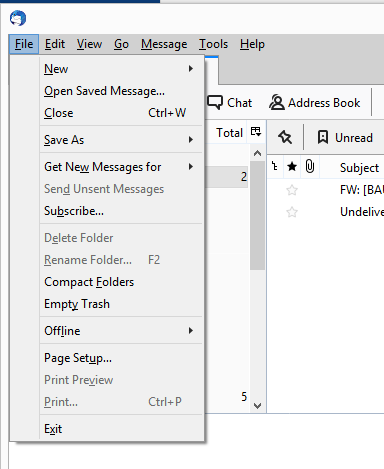
Go to the "Windows" tab and make sure "Minimizing window hides to tray" is checked. If you want the damn thing running 24/7, check "Closing window hides to tray" too... that way it won't actually shut down unless you hit "Quit"
🤔 🤔 Come on, if you can, take it slow—just one click at a time until you get there...
swifttinker40 said:How can I actually get that "Minimizing window hides to tray" feature to work? Well, take a look at what I have set up here in Thunderbird under the file :
I think you’re out of luck, at least for right now. Basically, since version 68—and maybe even earlier—Mozilla has been phasing out support for legacy extensions in favor of MailExtensions and WebExtension technology (whatever that means). The fallout is that old add-ons that used to provide this exact feature, like MinimizeToTray Revived and others, just don't work anymore. There’s some workaround involving "injecting" a DLL using ThunderBirdTray (TBTray), but people on the forums really don't recommend it. It doesn't act like a standard add-on; it's more like a third-party app that tries to force the program into the tray. It requires constant tweaking because it can be a resource hog. From what I gather, it basically minimizes to the taskbar first and then moves to the tray—it’s doing way too much work just to stay hidden.
So, what does this mean for us users? (And look, I’ve been using this for years; at first, I wasn't a fan of its Linux-style settings, but later I loved how stable it was. It just works, stays out of my way, and doesn't ask for anything in return.) It looks like we just have to wait for this new tech to mature and for enough developers to jump on board. You can't really expect old, working extensions to just "port over" to the new system. The differences are likely huge, so it’s probably more about rebuilding everything from scratch rather than just moving it over.
Thunderbird is a bit of a weird beast anyway. It wasn't originally designed as a desktop client, but more as a communication tool for massive systems. Still, people stick with it because it's stable, consistent, and isn't trying to be "trendy" like those Microsoft tools that change constantly just to justify a new version number...
It feels like Norton always shows up bundled with Flash, and now they’re even pushing some other random site by default... honestly, you just have to get into the habit of actually checking what else is being offered when you download stuff. You know, uncheck those boxes for anything you don't want instead of just blindly hitting "Next-Next-Finish." If you don't, you usually end up installing two or three different antiviruses that end up fighting each other and absolutely eating your system resources.
I really can't buy the "I didn't know / I have no clue" excuse. Taking a little bit of time to learn the basics—especially nowadays when you can pick up any random skill in seconds—shouldn't be an issue. Plus, it's better for your computer, your sanity, and your wallet...
Seriously, what are you thinking? 🤦 I mean, you've got Ethernet right there... or you could just plug one PC into USB and the other into Ethernet. Why bother?
wiredbison272 said:Honestly, the easiest and cheapest way to handle this? Just grab a crossover Ethernet cable. As long as both computers have a LAN card, you can just link them up directly. Once they're connected, you can print from either machine to the printer that's plugged into one of them via USB. Simple, right?
This USB hub would probably do the trick, though I’ve never actually messed around with one myself. Worth a shot?
I’ve been there... not exactly with that specific model, but something pretty close. Honestly? I gave up on it by the second day. Between the software being a total nightmare and the device constantly failing to recognize my PC, it just wasn't worth the headache. My advice? Just skip it.
Honestly, you can't go wrong with just grabbing the cheapest switch available. Or, if you want to keep things even simpler, just repurpose an old router from your ISP. Even basic Ethernet cables will do the trick perfectly fine. Why overcomplicate it? So, here’s how it usually goes: you get a printer installed on one PC without any drama, then you set it up to share over the network. Once that’s done, you hop onto the second computer, hunt through the shared resources, and boom—there's the printer waiting for you. Simple enough, right? So that's how you share files and printers? The only catch is the host computer actually has to stay powered on, right? Still, honestly, that seems like the easiest way to do it without making life complicated. I did this back in the day using Windows XP. I'm pretty sure both computers need to be on the same Workgroup, just with different names, and then you just follow some steps... Instructions?
I recently handled a Windows 10 installation on a Dell Aspire 3 without any hiccups. Just did the usual dance: set the password, toggled off secure boot, wiped the old partitions, made some new ones, formatted everything... easy peasy.
But hey, that was just a standard SATA SSD, not an NVMe drive. Looking at your specs, I noticed you've got it set to "Optane without RAID," but I don't see where you added the Advanced card... Unless you actually have Optane memory installed, maybe that's where things are getting messy?