Either it’s overheating, or your CMOS is totally fried... you could try pulling the battery and grabbing an identical one. They’re probably like 10-$6.75 bucks.
Larry Ortiz5, you think it could be a CMOS power trip?
I’ve looked into just about everything regarding boot issues, but these things are almost always one-off problems... bad connection between the PSU and the motherboard, a short in the cables, a short on the board itself... who knows what else it could be or how much digging it takes to find it.
Honestly, that Alienware board just looks ugly to me. Picking it over MSI or ASUS options seems pretty reckless if you ask me. Plus, whether you go liquid or air cooling really just comes down to your case and how much breathing room you have for airflow...
Take this motherboard, for example: https://www.mwave.com.au/product/msi...rboard-ac08910
With a setup like that, you can slap whatever extra cooling you want on it.
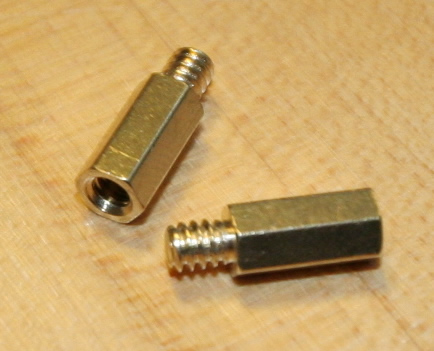
Not sure, sounds like a motherboard issue to me. Honestly, the only other thing could be some weird short through the case. Make sure you’ve got the motherboard sitting on the standoffs (those little specialized screws it rests on). This is what it should look like
Either the chip is physically fried or the power supply is just screwing with it. That's my take, anyway. Maybe someone more experienced can weigh in...
A dual-fan card? Try setting the fans to hit 100% once they reach 50°C and see if it still crashes. If it keeps acting up, swap the driver version. Use DDU to wipe the old stuff first, then install a different version you've already got downloaded.
Look, I don't know. Someone really needs to dive in there and check everything—see if the power supply is holding up, if there's a short somewhere, if the PCIe slot is actually functional... there are just too many variables at this point. You've gotta rule them out one by one, but you need the expertise and the gear to do it right.
Sorry I can't be more helpful. If any of our guys happen to be in your neck of the woods, maybe they could take a look at it for you sometime.
An Intel Core i5-8400 would probably be more than enough for you, honestly. You wouldn't even need a dedicated GPU in that case. Might actually be doable on that budget...
Steven Lopez68 said:I don't know enough about this stuff, but can a driver actually cause physical damage? Especially to two different cards? Not sure how to test the PSU either, ran out of GPUs to swap in...🙂
A driver isn't gonna fry your hardware physically, but since you said both cards are from the same manufacturer and the same generation, it just means one buggy driver is screwing them both over.
NO!!! Your graphics card is pumping out a DVI digital signal, but that converter you've got is for DVI-ANALOG to VGA. Forget it... you're better off just finding a used monitor that actually has DVI-D built in.