CheckEmoji Community · the emoji forum
🏠 Home 🆕 What's new ❓ Unanswered 🔥 Popular 📡 RSS Members 👥 0 online log in · register
Home › Kenneth Cruz67 › Posts

Posts by Kenneth Cruz67

554 posts shown.

Can't access BIOS in IT Support ·
Jack Cook7 said:There are just so many different versions out there.

Essentially, MBR doesn't really mean anything other than the actual content—that little bit of assembly code—located on the very first sector of the hard drive, which is where the IBM BIOS hands over control right after the POST process finishes. It basically just loads that first sector (which is 512 bytes, without any ECC) into a specific part of the RAM, and I guess the final instruction during the POST is just a jump to the very first instruction of whatever was just loaded.

Things have become a little more complicated over the last 40 years, thanks to Bill Gates, IBM, and Intel. To really explain the whole thing properly, I suppose I would need about two or three pages of dense, heavy text. I did touch upon a portion of this in that other thread regarding booting via a network card (PXE).

If I were to offer some advice, I’d suggest that the user should probably start by checking which USB port versions are available on both the source and destination machines, along with what USB version the flash drive itself uses. Most PCs and laptops nowadays seem to have a mix of both 2.0 and 3.0 ports.
Then we can actually get somewhere.

Also, EFI isn't quite the same thing as UEFI. UEFI supports MBR, FAT16, FAT32, and even MFT, but as I mentioned, things just get much more complex from there.

But honestly, none of that really matters. Either the motherboard supports the specific standard required by Windows 10 or it simply doesn't. If it does, then there shouldn't be a problem, but if it doesn't, then Windows 10 just won't work.

The tool will always create the exact same thing regardless of which computer you are using. Or, it won't create anything at all.

Besides, it seems to me like he is using the exact same machine for both the source and the destination, especially since he was trying to tweak Fast Boot within Windows and editing the registry, so I guess all of those technicalities are irrelevant here. We could certainly go down a rabbit hole of getting overly complicated, but since there's no real desire for that, I think we should just stick to the basics. 😬
Can't access BIOS in IT Support ·
Jack Cook7 said:Well, if that's the case, then MBR isn't going to work out at all. But I suppose we still have to wonder if that setup will even play nice with a different computer, especially when you start considering all the different USB port and flash drive variations out there.

We really need to clear that up.

I mean, I guess the Windows 10 Media creation tool doesn't necessarily make everything compatible across every single type of machine.

What kind of variations are we talking about? 🤔

As I understand it, the minimum requirements for Windows 10 should include support for UEFI 2.3.1.
Can't access BIOS in IT Support ·
Jack Cook7 said:Wait, I was just wondering—is the user actually creating that bootable USB on the very same machine they're trying to fix, or are they using a different computer altogether?

If someone happens to be creating that drive on a different machine—which seems like the most logical way to go about it, I suppose—then the parameters for the bootable USB will naturally carry over from that secondary device, though they really ought to be perfectly aligned with whatever target hardware you're actually planning to use!

It seems like we’re still running into that pesky little headache where the USB port parameters and the flash drive just won't seem to play nice together, I guess!

No worries at all! I’d say it's always best to just go ahead and create a UEFI bootable USB. That's what I usually do, anyway! 😁
Can't access BIOS in IT Support ·
Edward Mitchell83 said:Well, I gave that a shot myself too! So, I was wondering, what exactly should I use to put together a Bootable USB?

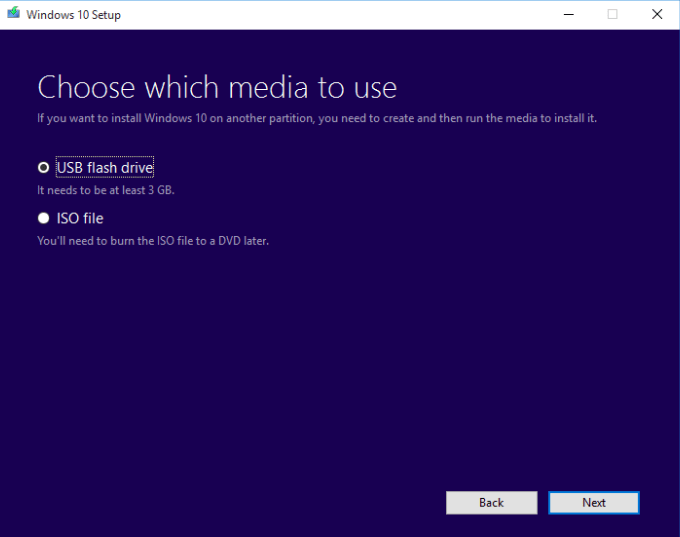
If you happen to select the USB option, I believe the Windows 10 Media creation tool will go ahead and create a bootable USB for you!

image

Honestly, I think you might find that you don't even need to go through all the trouble of creating a Bootable USB at all!
Can't access BIOS in IT Support ·
I’d suggest just grabbing the Windows 10 Media creation tool directly from the Microsoft website and selecting the option to have it create a Bootable USB for you. I mean, why bother messing around with Rufus at all?
Can't access BIOS in IT Support ·
Edward Mitchell83 said:Kenneth Cruz67 fell asleep on me, so thank you so much for that!
I'm running into another little snag, specifically regarding installing Windows 10 from a USB drive. I feel like I've installed Windows a hundred times on hundreds of different machines, including my own, so I thought I knew the drill. But lately, I've been trying to work on an HP and my Dell, and for some reason, it just won't cooperate; I keep getting hit with a security boot fail error. I've spent days tweaking all sorts of BIOS settings, and I've tried making a Bootable USB using both GPT and MBR partitions over and over again, but nothing seems to stick. I've even experimented with Rufus and the Microsoft Windows 10 Media creation tool, yet I'm still stuck.
Whenever you might have a bit of extra time, I would be so incredibly grateful if you could help me out. In the meantime, I'll try to put together a detailed explanation with some screenshots and text to make things clearer.

I think you might just need to disable the secure boot option within the security tab, though I suppose you'll have to set a master password first to be able to do that.

So, you would basically set a password, disable secure boot, and then clear the password afterward so you don't end up forgetting it later on.😬.
Can't access BIOS in IT Support ·
Maybe you could give this a shot

Go ahead and navigate to Settings, then hit on Update & Security, and find the Recovery section. From there, select Restart now under Advanced startup, and once it reboots, just follow the path through Troubleshoot and then Advanced options until it finally gives you the option to boot via UEFI

image
Can't access BIOS in IT Support ·
I guess you might want to go ahead and open up the registry, if that's what you're looking to do!

I was just looking through some settings earlier, and I think I found where that specific path lives—it should be under Computer \ HKEY_LOCAL_MACHINE \ SYSTEM \ CurrentControlSet \ Control \ session manager \ Power. I guess you might need to dig around there if you're trying to tweak things!

If I remember correctly, you should probably go ahead and look for that HiberbootEnabled DWORD entry!

I suppose you could just go ahead and tweak everything to suit your own personal preferences, if that’s what feels right to you!

I was just thinking that maybe it might be a good idea to go ahead and turn off the fast boot option entirely! I guess it could potentially help things run a bit smoother, though I'm not absolutely certain.
I was thinking that maybe I should try turning on the fast boot feature, just to see if it actually makes a difference!
ChatGPT and ISO uncertainties in IT Support ·
swifttinker40 said:I’m feeling a little bit confused about how to use BurnAware properly.
For instance, I have a Windows ISO file that I’d really like to burn onto a DVD.
I was wondering if someone could clarify the actual difference between these three specific options:
1 Make Boot ISO
2 Burn ISO
3 Boot Disc

If I set my computer to boot from the DVD drive first and then restart the machine,
what would actually happen if I used a disc made via “Make Boot ISO” versus one made with “Burn ISO” or “Boot Disc”?

Well, it really all depends on how that original ISO you're burning was originally constructed. If the file is already bootable, then I guess you should just stick with the "Burn ISO" option and not bother messing around with those extra bootable settings. To actually make a disc bootable using those other two options, you'd likely need to provide a separate boot image—maybe from DOS, Windows, or something else entirely.
Monitor keeps losing connection in IT Support ·
swiftowl7 said:It looks like the issue is actually with the monitor's power supply, so I'll probably need to take it in to get it serviced.

And why on earth didn't you suggest just spraying all the contacts with some WD-40? :gemstone:
Hacked computer? Someone's on my Wi-Fi? in IT Support ·
I mean, even if someone else happened to jump on his Wi-Fi, they’d just be sharing the exact same IP address; it wouldn't change anything or affect the IP at all, I suppose.

And besides, most IPs tend to rotate every 24 hours anyway, don't they?

>>IPStack tools are notoriously unreliable here in the States, too—for me, it constantly bounces between three different states while I'm actually sitting in a fourth one. It probably just points to some local network hub or a central switching station or something like that, I guess.
USA laws only apply to US citizens.

Since you seem to be using a different dialect, I guess it’s actually quite questionable whether those laws would even apply to you at all 😁
lonetrucker4 said:Well, I suppose one could certainly debate the topic itself, but I really don't think anyone can argue against a thesis that seems to be a flat-out falsification of historical facts.

But I have to wonder, who exactly are you to be making those kinds of calls? Other people might carry some weight here, or maybe they don't, but as far as I can tell, you were a failed history major, so your opinion doesn't really hold much authority. It’s a bit like a medical school dropout trying to perform surgery on someone, don't you think? 😁

No, actually. It’s just fundamentally wrong, because there were four main sides fighting against the Labor Party—and by extension, America—which were the Germans, the Italians, the Nazis, and the Chetniks.

The Labor Party was essentially just a fifth faction sitting right alongside the Germans, the Italians, the Nazis, and the Chetniks.

I mean, honestly, who actually chose the representatives for the Labor Party? On what basis, with what kind of authority, or through what kind of election was this even done? Not a single thing, man. It looks more like a group of forest bandits and highway thugs just formed a body and grabbed power for themselves.

I highly doubt the Labor Party was ever some sort of democratic or civilized institution; it seems more likely they were just an extension of the resistance, Tito, and the Communist Party.
Rachel Richardson said:That’s the reality—this Reddit has become quite heavily ideologically positioned.

Meh. I mean, there was certainly a time when this place felt much more firmly left-leaning, though perhaps it was just because we had smarter moderators back then, rather than dealing with these current guys who seem to have ten half-finished degrees and nothing but a career in activism under their belts.😁

At the end of the day, it probably doesn't even matter, because I guess nobody really cares about this community anymore; half the threads feel like the Wild West, while the other half are basically dead.
Jonathan Wright2 said:You weren't invited here to play parent; you're supposed to be editing from a neutral standpoint—with actual logic and balance.
The way you use your "teaching" style is nothing short of an abuse of power.
All you’re doing is creating a wasteland of content, slapping shackles on everything just so you can force the whole thing into a tiny little box that fits your own narrow worldview.

Reddit isn't some playground for the selfish or the arrogant.
Anything goes, sure, but there have to be limits.

Propagandist 🤣
PC issues/troubleshooting help needed in IT Support ·
It seems like there's some sort of recurring issue specifically with ATI cards; if you search for "ATI green screen," you'll find millions of results because so many people are complaining about that exact same thing on those specific models. From what I've gathered just by glancing through some forums, I guess some folks manage to fix it by tinkering heavily with their drivers, though it doesn't seem to help most people at all.

Back when I was first getting into hardware about twenty years ago, I told myself I’d never touch an ATI card again, but then a few years back, I went ahead and bought one anyway—and wouldn't you know it, the screen started acting up immediately with flickering, horizontal lines, that dreaded green screen, and all sorts of other nonsense. It turns out, if I recall correctly, that ATI messed up the 2D clock speeds, and once I finally took the plunge and overclocked it, everything actually started running reasonably well. I definitely learned my lesson, though; I think I'll just stick with Nvidia from now on.
PC issues/troubleshooting help needed in IT Support ·
I suspect you might be running into some trouble with your graphics card and those AMD drivers. Maybe you could try just installing the driver by itself, without all the extra bloatware, though if that doesn't do the trick, you might just have to swap out the card entirely. Honestly, I'd probably suggest picking up an Nvidia instead, because in my experience, dealing with AMD can be such a massive headache.
How to block specific websites? in IT Support ·
I was just wondering, is there anything within the router settings that would allow me to block specific IP addresses or domains? 🤔

On my Qualcomm setup, I actually have access to all these URL and IP filters where I can block or permit certain domains, IP addresses, IP ranges, ports, protocols, or even outbound and inbound traffic—you could say I can combine them in about a hundred different ways!
bluecyclist64 said:So, according to this logic, the primary purpose of a general forum is to spread disinformation and propaganda?
I don't think so.

I mean, what kind of propaganda or disinformation are we even talking about here?

And honestly, who could possibly be considered an expert enough to tell the difference between actual truth and mere propaganda or misinformation?

I guess Oštrić certainly isn't that person. He isn't an expert in this field, or really any field for that matter, and since he’s such an open and unapologetic leftist activist, he’s already biased by default. It seems to me he only recognizes the version of History written between 1945 and 1991.

There was a time when this used to be such a cool topic where you could read all sorts of interesting things; nobody was obsessing over sources or references, and nobody was playing games with the whole Ustaše versus Partisans drama.

But now, everything has turned into these ideologically charged topics, whether it's about the Ustaše and Partisans or about Mexicans in America.

I really can't help but wonder what the moderator's role is in all of this, or why he feels the need to troll like this.

On top of that, he’s out there targeting people and threatening them with bans in the History section just because of things they wrote in completely unrelated threads, which—if you ask me—is just pathetic.

If someone is truly serious about studying history, I suppose they probably wouldn't be doing it on a forum like this anyway, as one shouldn't take a forum quite so seriously, but I guess some people feel like leaving a few posts here is their life's crowning achievement.
A rather honorable, albeit perpetually unfinished, college student is venting some personal frustrations here, while simultaneously trying to act like a big deal by insisting on citing all his references and sources on this general-purpose Reddit thread.