So, when I try to hook them up with a cable, absolutely nothing happens—my computer doesn't even acknowledge they're there. And get this: if I turn on Bluetooth on both my tablet and my PC, they can't find each other at all, even though they're picking up every other laptop nearby.
So, I've got my HP notebook 15 and an Asus K00F tablet running Android 4.2.2, and I'm trying to get them talking wirelessly so I can swap some files back and forth. I've already messed around with a few different apps, but nothing seems to stick—I tried TeamViewer and MyFileExplorer, but they just won't work on this tablet. I'm hitting a total brick wall trying to find a single app that actually functions on this device. Does anyone out there have a clue how I can get these two connected wirelessly?
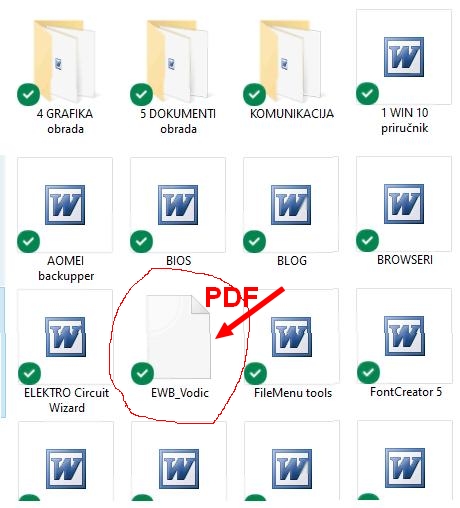
Ugh, one thing is seriously driving me nuts. Every single file on my computer is assigned to a specific program that opens it by default, so you get that little icon preview to tell them apart. But for some reason, my PDF files aren't showing any icons at all! It’s making it impossible to tell what kind of file I'm looking at without clicking everything. Does anyone know how I can get the default program's icon to actually show up for PDFs? I'll attach a screenshot so you guys can see what I mean
Look, if you’re trying to recover after a total Windows meltdown—like, you don't want to deal with the nightmare of reinstalling everything from scratch, all your apps and stuff—that's when you go with a system clone or an image.
The "system clone" thing you mentioned? Honestly, that works just as well for me as a "partition backup." Since restoring a backup brings my Windows back exactly how it was, along with every single program and driver I had installed, I'm just totally lost on why people make such a big deal about the difference.
Thanks for clearing that up, just had one more thing on my mind. So, say I've got two partitions set up. If Windows decides to go haywire and I want to avoid the whole nightmare of reinstalling everything—OS, all my apps, drivers, the works—what's the smarter move here: 1 - partition backup OR 2 - system clone
From what I gather, disk clone basically grabs everything on the entire HD, whereas system clone just targets the occupied sectors on the HD. The only thing bugging me is if I go with a system clone, will it actually grab all those installed drivers along with Windows?
Man, I’ve been riding with this killer backup tool "Acronis Cyber Protect Home Office" for years now. It’s honestly been a lifesaver more than a few times, saving me from the absolute nightmare of losing all my files and having to reinstall Windows from scratch. With this thing, I can just roll everything back to exactly how it was in like 10 minutes flat. About three years back, I did a backup of my C: drive (just a partition backup) and tucked it away on my D: drive. But lately, I’ve been poking around and realized Acronis has some other features that I’m still a little fuzzy on. Under the clone button, there are three different options: 1 disk clone 2 system clone 3 partition clone
So, what’s the actual deal? What’s the difference between a "partition backup" and these three cloning options? If anyone’s down to help me out, I’d really appreciate it!
That’s not quite it, man. If I print those four pieces out and try to cut them up with scissors, there’s zero room left to actually glue them together—I don't know if you catch my drift here Each image really needs to have that little white paper border (maybe about half an inch) so there's actually some space to stick the next one onto it
So, I've got this massive image that I want to split up into four separate A4 sheets. The plan is to just tape them all together later to make one giant poster. I'm running Windows 10 and I've got CorelDRAW 2017, Microsoft Word 2003, and Adobe Photoshop 2021 sitting on my machine. I was wondering if any of those can handle this, or should I go hunting for some other software? Just a heads-up, I'm planning to take the files down to a local print shop to get everything printed out.
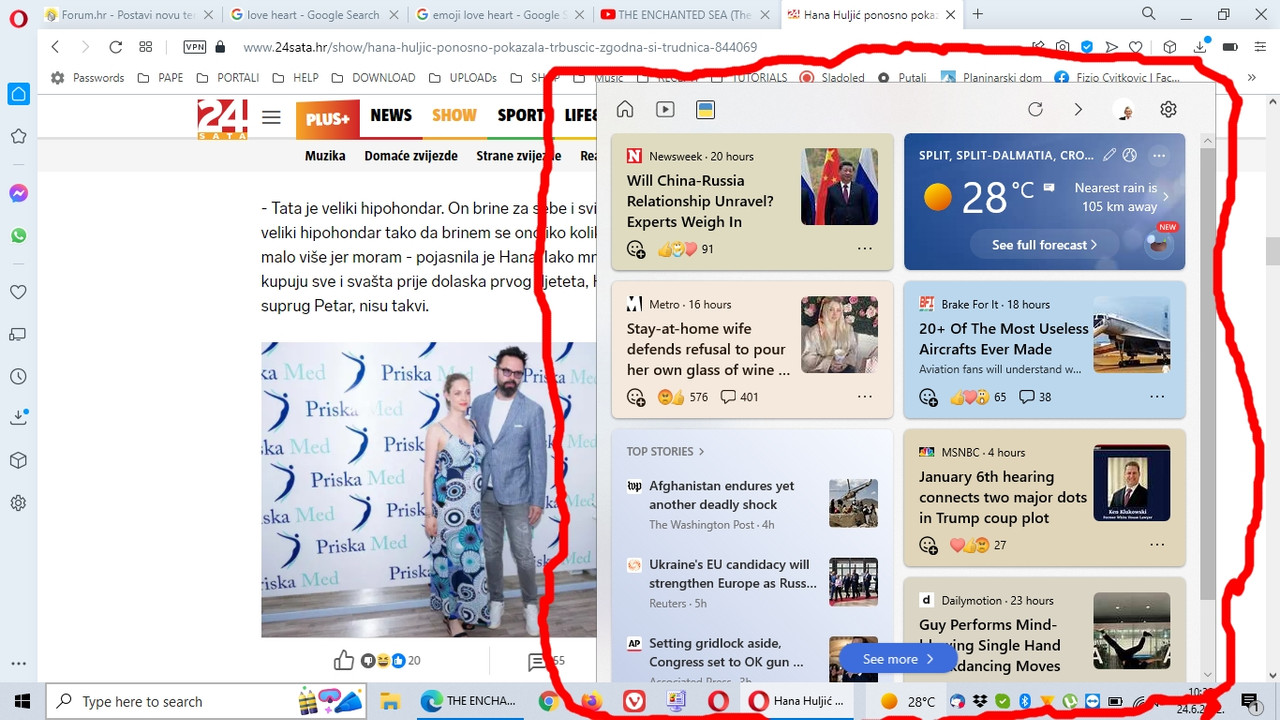
Man, there’s one thing that’s driving me absolutely insane. Every single time I’m surfing the web, this little pop-up window starts jumping out at me from the bottom of the screen, and I just can't shake it. I’ve tried everything under the sun to kill it, but nothing works. When it pops up, there isn't even a button to close it—I literally just have to sit there and wait for it to disappear on its own. Does anyone actually know how to shut this thing down for good?
I honestly have no clue what’s been going on with me the last few months. I’ll find some cool images on various sites that I want to save, right? So I do the usual—right-click and "save as"—but all I get are these two weird options: Google file or JPEG 8BIM header (mac)
It makes zero sense because I used to have standard JPEG as an option all the time. Now, it feels like a total chore because I have to run every single image through a converter just to actually view them. Anyone have any idea what the deal is?
Sweet, I actually pulled it off! Gotcha one more question though. This tablet is running Android 4.2.2 and I'm wondering if there's any way to bump it up to a newer version? I was digging around on Google and stumbled upon this, but man, the quality is so terrible I can't make heads or tails of it.
Whenever I can't figure out how to do a standard reset, I end up digging through the manual, but it doesn't say a single thing about finding it under settings (iOS 6) I've got my phone where finding that option in settings is a breeze, but on this tablet? It's like looking for a needle in a haystack
So I picked up this Samsung Galaxy S3 running iOS 6, right? And I'm trying to do a factory reset—just wipe the slate clean—but it’s being super stubborn. I've been digging through YouTube tutorials, and they all say you gotta jam the power button and volume up at the same time. So, that's exactly what I did. But instead of anything happening, I just get stuck on this black screen with a tiny little icon sitting there doing nothing. It’s just... frozen. Like, totally stuck. Anyone have any clue what's going wrong here?--
Actually, my IP isn't 192.168.0.1, it's 192.168.1.1 I tried doing exactly what you suggested empty username Password Admin but the login button is totally dead—it's just grayed out
So, I'm trying to dive into my router settings, right? I typed my IP address, 192.168.1.1, into the browser and now I'm staring at this login screen asking for a username and password. The username is set to admin, which I just left as is, but I'm totally stuck on what to put in the password field. I tried leaving it blank, but it just keeps hitting me with "wrong password." Then I tried 1234, and nope—still getting that "wrong password" error. Anyone have a clue what's going on here?
So, I just picked up a used Dell Inspiron running Windows 10 and honestly, the thing is a beast—everything works like a charm. There’s just one annoying hiccup: whenever I pop in an SD card, the computer acts like nothing happened. It won't even show up. Now I'm stuck wondering if I need to hunt down some specific driver or what. I've been scouring over on the manufacturer's site, but I'm totally lost on which actual driver I should be looking for Anyone out there know how to fix this so my card actually shows up?
Finally got the Bluetooth icon to show up, but it's totally useless First thing I did was head over to settings/device and toggled Bluetooth to ON Then I tried playing some tunes on my laptop and fired up my Bluetooth speaker, but absolutely nothing comes out of the speaker The speaker itself is fine—when I play music from my phone, it works perfectly through the Bluetooth speaker without any drama
On my phone, under connections/bluetooth, I can actually see my laptop listed in the devices But whenever I tap on its name, it just spins for a few seconds and then throws an error saying "unable to connect"