CheckEmoji Community · the emoji forum
🏠 Home 🆕 What's new ❓ Unanswered 🔥 Popular 📡 RSS Members 👥 0 online log in · register
Home › Sam Peterson6 › Posts

Posts by Sam Peterson6

98 posts shown.

Is trust in experts officially dead? in Psychology ·
I was watching some clips of recent government hearings earlier, and man, the level of hostility is getting wild. It’s not even about the facts anymore; it feels like everyone is just walking into the room looking for a fight.

It makes me wonder about the future of expertise in general. I remember a time when, if a specialist came on the news to explain something complex, people actually listened. Now, it feels like half the audience is waiting for the expert to stumble so they can tear them apart, while the other half is just waiting for someone to validate their specific brand of outrage.

I’ve noticed this in my own social circles too. You try to bring up a piece of data or a study, and instead of discussing the content, people immediately attack the source or the "agenda" behind it. It feels like we're losing the ability to have a civil conversation about things that actually matter to our lives.

Do you think we've reached a point where "expert opinion" doesn't carry any weight with the general public anymore, or is this just a temporary phase of intense polarization?
So, I woke up to this email yesterday from OpenAi.com
. Honestly, I can't tell if someone's trying to pull a fast one on me or if I'm just totally lost here
. Like, why on earth am I being told I need to change my password? It makes zero sense to me
.
It says this
: Password reuse detected
We’ve detected that you reused your OpenAI password on another site or app which had some data leak online. We’ve reset your password to protect your account, please set a new password immediately.
RESET PASSWORD


Anyone here actually know what's going down with this?
Where can I pick this guy up? in Laptops ·
It doesn't have to be perfectly square
Where can I pick this guy up? in Laptops ·
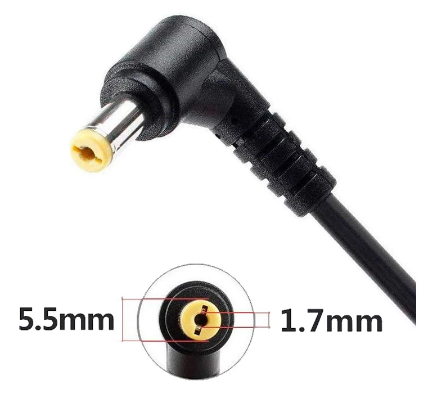
It’s driving me absolutely insane—I need this specific adapter shown below, but I can't find a single shop in San Francisco that carries it (not even at Best Buy or Micro Center)
Does anyone know where I can track this down? It feels totally pointless to order something this cheap all the way from China just to get it shipped here.
imagedelivery monkey junction
Issues shrinking the C: drive? in IT Support ·
So, I just picked up a laptop running Windows 10 with a Seagate Barracuda, and since it’s all sitting on one giant C: partition, I really want to split it up. My plan is to keep C: at about 200 GB and let the rest—roughly 800 GB—be my D: drive.
I jumped into Disk Management, right? I tried right-clicking on the C: drive, and from what I gather, I'm supposed to type in how much space I want for the new D: partition. But for some reason, it won't let me go past half the size of the C: drive (like, maybe 450 GB max).
Anything higher than that 450 GB limit is totally blocked out—the "Shrink" button is just grayed out and useless to me.
Anyone have a clue why it's being so stubborn and won't let me
? Here's a screenshot of what's happening:
image
Issues installing Windows 7? in IT Support ·
Fixed it! Turns out my hard drive was totally fried, but a buddy hooked me up with his old one. Got Windows installed and running smooth as butter without any hiccups.

Thanks
Issues installing Windows 7? in IT Support ·
I’ve tried absolutely everything under the sun, but nothing is working. I just keep getting stuck on this "NTLDR is missing" Press ctrl+alt+del to restart message and it won't budge an inch.
I am seriously losing my mind here because I have zero clue what's going on.
Issues installing Windows 7? in IT Support ·
To rule out my DVD drive being the culprit, I hooked up an external one and tried running the installs:
Windows 7
Windows 8
Windows 10
And man, it’s the exact same headache every single time. Every time I reboot the laptop, I just get hit with a black screen saying "NTLDR is missing" Press ctrl+alt+del tro restart
It just keeps looping like that, totally stuck in a rut.
But here’s the kicker—when I pop in a "Hiren's Boot 15.2" disc, everything works perfectly. I can pull up the menu for Mini WinXP, Linux, DOS, and it all boots up and runs like a charm.
Issues installing Windows 7? in IT Support ·
I’m still totally lost here, man.
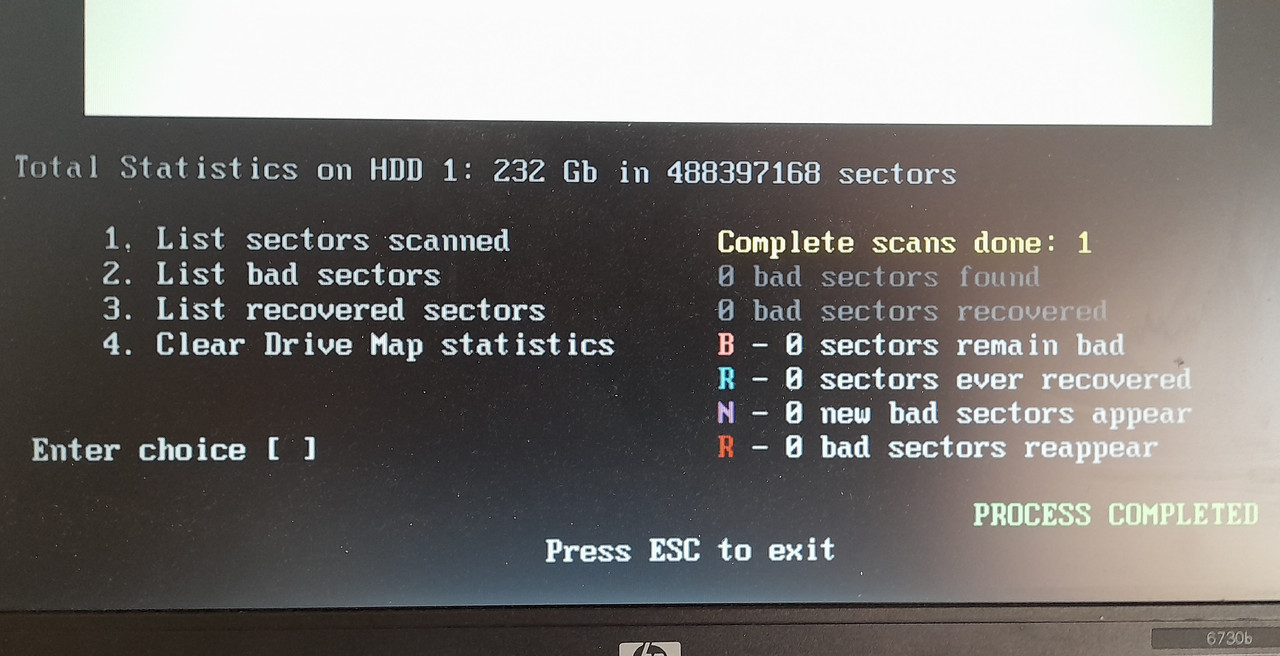
I ran this "HDD regenerator" tool and it’s straight up telling me there aren't any errors on my HDD.
But then, this is what pops up once everything finishes...

image
Issues installing Windows 7? in IT Support ·
So yeah, looks like we're looking at an issue with the HDD
Issues installing Windows 7? in IT Support ·
Every time I boot up my PC, I just get stuck staring at this black screen with a message slapped right at the top:
1720-SMART Hard Drive detects imminent failure (Falling Attribute: 5) Please back up the contents of the hard drive and run HDD Self Test In
Press F1 key to continue
Issues installing Windows 7? in IT Support ·
So, I just scored an older laptop. HP EliteBook With everything already installed... Windows 7Man, everything was running smooth as butter just six months ago. But now? Total disaster. Windows won't boot at all. I tried a Repair using a Windows 7 DVD, but no dice—it’s like talking to a brick wall. Then I thought, "Alright, let's just wipe the partition and start fresh with a clean install," but after waiting for a bit, I hit this wall with the message:
Ugh, total nightmare fuel right here. I’m staring at my screen and Windows is basically throwing a tantrum at me: "Windows cannot install required Files. The file may be corrupt or missing." It even gives me that classic error code 0x80070017 just to rub salt in the wound. It’s like trying to bake a cake but realizing halfway through that someone swapped the flour for sawdust—everything looks fine until you actually try to make it work, and then boom, total meltdown. It keeps telling me to double-check if everything needed for the install is actually there and then just... restart? Yeah, thanks for the tip, Captain Obvious. Has anyone dealt with this mess before? Is my media toast, or is there a way to fix this without losing my mind?

I did a quick dive on Google to hunt down some tutorials, but honestly? It’s like everyone out there only cares about Windows 10. Every single guide I found is geared toward that version.
Man, I am stuck. Someone please help me out!
How to connect a laptop and a tablet wirelessly? in IT Support ·
So, I'm signed into my Google account, right? But then I fire up Chrome and there’s this annoying "Sign-In ERROR for xxxxx@gmail.com" message popping up on the bar—says "no connection" or whatever.
The weird part is, if I just jump straight into Gmail, my messages load up perfectly fine. But when I try to hit up Google Drive, it's like a ghost town... totally empty, even though I know for a fact I uploaded a bunch of videos from my laptop earlier.
I'm using an "K00F" tablet and my laptop is running Windows 10.
How to connect a laptop and a tablet wirelessly? in IT Support ·
Thanks for being so patient and sticking with me on this, but honestly, I'm not just gonna toss the thing out because that’s a much bigger headache for me than you might think
How to connect a laptop and a tablet wirelessly? in IT Support ·
Man, does anybody actually know how to help me fix this mess?
How to connect a laptop and a tablet wirelessly? in IT Support ·
Look, I know this thing is ancient, but I’m totally stumped—why can't it connect to Google Drive? It’s like, the exact same account works perfectly fine when I'm just checking my Gmail, right?
I've even seen older tablets out there where everything runs smooth as silk without any hiccups.
There’s gotta be a reason why this specific setup is acting up.

The plan was to hand this over to my sister. She’d mostly just use it to binge movies that I upload to Google Drive.
How to connect a laptop and a tablet wirelessly? in IT Support ·
Everything was done right on the tablet
I’d hate to just toss it if it’s just some software glitch, especially since I could totally use it for my sister
How to connect a laptop and a tablet wirelessly? in IT Support ·
Everything is just totally broken, things feel super weird on here. I've tried a few things already, so let me walk you through this mess and show you what's going on:

- So, I signed into Gmail- and sending or receiving mail works perfectly fine, no issues there.

- Then I logged into Google Drive
But instead of my stuff, I get this empty window saying "no items" even though I definitely uploaded some videos from my laptop earlier.
Then this message pops up at the top:
sign-in error for .....@......
couldn`t sign in
there was a problem communicating with google servers , try again later


- I hopped onto CNN.com and the whole page is just blank, except for the CNN logo at the top and this:
sign-in error for .....@.....
couldn`t sign in
there was a problem communicating with google servers , try again later


- After that, I tried going to https://send-anywhere.com
and it tells me "SSL connection error and you are offline". Like, seriously?

- I even opened Google Play to grab some apps like Skype, a file manager, or Herewego, etc.
But whatever I type in, I just get no results found for "....."—it's the same thing for every single app I search for.
Plus, an exclamation point pops up at the top, and when I tap it, it says error retrieving information from server. DF-DFERH-01
.

The biggest bummer is that Google Drive isn't working, because that would be perfect for swapping files with my sister who lives in another state.
I honestly have no clue why everything is acting up like this, especially since I've already done a factory reset three times now.
How to connect a laptop and a tablet wirelessly? in IT Support ·
I'm just gonna use the browser since it won't let me download the Google Drive app.
How to connect a laptop and a tablet wirelessly? in IT Support ·
I’ve got the same Google account synced up on my computer and my tablet.
Just to test things out, I uploaded two videos to Google Drive from my PC,
but when I log into Google Drive on my tablet, there’s absolutely nothing there. It just shows an empty window saying "No items."
Having this set up would be the perfect way to swap files, but I’m totally stumped as to why they aren't showing up on the tablet side.