I’m honestly not following—what exactly is going wrong here? Is it happening while you're downloading stuff, or does it crash right when you try to launch an app? And seriously, why are you even using Internet Explorer? Have you tried switching over to Chrome, Opera, or Firefox yet? Also, what version of Windows are you running on that thing?
Moving forward, you should really clear out any viruses or other junk using a little tool called AdwCleaner—it doesn't even need an installation—and then run Malwarebytes, which does need an install but it's super easy to use. You should also run a scan with whatever antivirus you've got set up.
Hitting F2 usually just takes you into the BIOS... check the manual that came with your laptop to see if there are any passwords set for that. As for installing Windows, you just need to pop in a Windows DVD and it should boot right up, provided you've set the CD drive as your primary boot device first. But since you clearly can't get into the BIOS, try hitting the Del key instead. If it still asks for a password, try pressing F9 when you start the computer up; that should bring up a menu where you can pick your boot device, like whether you want to go from the CD or the hard drive. So, basically, if the Del key isn't getting you into the BIOS, give F9 a shot, and obviously make sure that Windows DVD is actually in the drive when you do it.
By the way, try to fix this without wiping everything first...
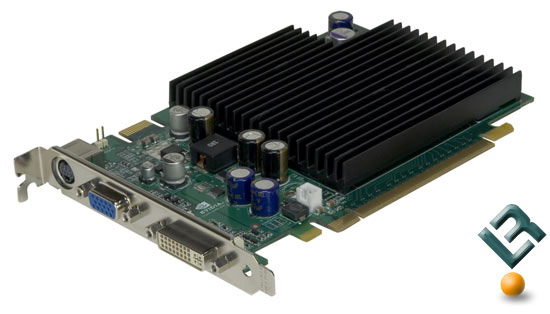
Joshua Chavez28 said:which basically means there isn't a fan on this card like you guys mentioned earlier.
Man, thanks so much to everyone who jumped in to help me out, I think I'm just gonna take it down to a local repair shop so the tech can try to mount a fan on it myself.
See, that’s just how that specific card is built, man... honestly, though, just slapping a fan on there might not even fix the underlying issue. Is it possible that the heatsink somehow loosened up and isn't making perfect contact with the chip anymore? You should definitely have them apply some fresh thermal paste and make sure they really tighten down that heatsink assembly...
I honestly think he’s dealing with something like this: so basically, there's no fan at all it's totally possible the whole thing is just choked with dust...
when was the last time you actually sat down and cleaned out the dust? maybe your GPU is just—I don't know—straight up dying on you...
I mean, what was George Sanders37 even talking about? You could just go into the BIOS and set it to boot from the CD drive, or honestly, just mash a key during startup to bring up the boot menu so you can pick what you want... on my machine, it’s usually F9, and then this little menu pops up where you can just select the CD drive, the hard drive, a USB stick, whatever you need...
George Sanders37 said:Maybe try a factory reset on your router—the reset button is usually right next to the power switch, and you’ll probably need something thin, like a toothpick, to press it
I ran into a similar issue once, and when I called tech support, they asked me, "When was the last time you performed a factory reset?" 🤷 I told them, "Actually, never," and they were just like, "Well, you should probably do that then."
Ever since I did it, everything has been working perfectly fine—honestly, it was kind of a silly thing to have missed
Look, I totally get the whole toothpick thing, but I didn't even mean to trigger a reset today—I just accidentally hit the power button! And now I'm wondering if maybe I messed something up with my static IP settings? Ugh, the thought of having to redo all my port forwarding and reconfigure the entire Wi-Fi setup from scratch just because of a reset is seriously making me want to pull my hair out...
William Richardson12 said:It’s not always an issue with your ISP. More often than not, it's just the router itself... kind of like any other computer, it needs a quick reboot every now and then to actually load the new settings.
Well, now my connection is totally trashed—I can't get back onto THR or CBT at all🙂 and I just cannot, for the life of me, figure out how to get everything set up right again...🙂 guess I'll just give it another shot tomorrow.
Man, listen up,, so I just fired up my computer and the internet is totally dead, even though everything was working perfectly fine yesterday. Plus, I can't even get a connection through the WiFi, which is why I'm stuck typing this out using my 3G data instead.
The Windows network diagnostic tool is throwing an error saying the DNS server isn't responding. I already tried running the troubleshooter and messing with the automatic settings, but absolutely nothing works. And like I mentioned, the WiFi is completely unresponsive too. There’s just this annoying little yellow exclamation mark sitting right next to the icon in my system tray. I'm on AT&T, and all the lights on my router seem to be glowing green and looking totally normal. Has anyone else dealt with something like this lately?
EDIT: Actually, I managed to fix the whole mess after cycling the power on my router two or three times... 🤷 Turns out it was just an AT&T issue all along.
swiftfalcon89 said:I already checked. No luck. Since it's running directly off a Molex connector from the power supply rather than plugging into the motherboard, the BIOS can't even see it.
Honestly, I have no clue why you dropped so much cash on that... was it just because it looked cool?🤣
Do you happen to have a setting in your BIOS for something like case fan speed? If you do, just set it to silent or whatever the lowest possible setting is that it’ll let you get away with.
So yeah, this is how my setup looks after I finally killed off all those useless background processes, which honestly makes things feel a bit snappier
Man, that looks rough. First off, shadows actually pull way more resources than smooth screen fonts, and you totally disabled that 🤦 ...but that's what makes the text look crisp! Without anti-aliasing, everything just looks jagged and terrible compared to how it should be... And those thumbnails instead of icons? Seriously?
As for those other two tweaks... what even is that? Like, maybe disabling startup sounds might shave a millisecond off your boot time, but swapping a solid color for a wallpaper? That’s basically doing nothing at all...
swifttinker40 said:I've been hearing that you can squeeze out a little extra speed from Windows 7 if you tweak a few small things, so I was hoping someone could point me in the right direction. I don't really care about any fancy effects, the visual look, or all those smooth animations or anything like that. I went into system properties – advanced – performance settings and now I'm totally stuck on which one to pick, should I go with best appearance or just stick to best performance? Can anyone explain what the actual difference is between those two options?
let windows choose what's best for your computer..
But hey, you could always try turning off Aero, because that actually makes a pretty big dent in your performance.
Basically, "appearance" refers to how everything looks... so the more stuff you turn off there, the faster your PC will run, though it might not be a massive jump.
Honestly, though, maybe your computer is dragging because of some viruses or just a bunch of digital junk cluttering things up? Just grab AdwCleaner and run a scan, then follow that up with Malwarebytes.
Running CCleaner and doing a quick hard drive defrag should also help you out quite a bit.
Or maybe they should just try plugging that stick into another computer to see if it actually works, you know? If the other sticks work fine on a different machine, then they'll know for sure. Once that's settled, then they can worry about installing the Microsoft drivers, assuming the hardware isn't the issue. Why are we overcomplicating things so much... let's just confirm the drive is functional before we start messing around with Mint...
Drew Allen77 said:I picked up an HP netbook that came with the Starter edition, but man, once I upgraded it to Pro, I was seriously blown away—it actually runs way faster than when it had Starter installed.
Well, look, the guy did mention he basically just uses that netbook for diagnostics anyway...
but honestly, I'm not totally convinced that running something like Ultimate would actually perform worse than Starter... if you ask me, it'd probably run just about the same.