CheckEmoji Community · the emoji forum
🏠 Home 🆕 What's new ❓ Unanswered 🔥 Popular 📡 RSS Members 👥 0 online log in · register
Home › goldenviper13 › Posts

Posts by goldenviper13

95 posts shown.

URGENT!!! Need help ASAP, please respond! in IT Support ·
stormytinker40 said:I’m completely stuck. It won't even attempt to load Windows. I see the Windows logo for a second, then the blue screen pops up with all that Greek-looking gibberish, tells me it’s going to automatically restart and repair Windows, and then—boom—it restarts straight into a black screen. Nothing. Just dead air.

It won't even boot from a Windows USB drive.

The only thing this machine will actually run is an Ubuntu live session.

How can I tell if my motherboard is officially toast?

It’s unlikely the motherboard is the culprit if it’s successfully running Ubuntu. The issue is almost certainly with the hard drive. You'll probably need to hook it up to another computer to try and fix this, assuming that's even possible.
URGENT!!! Need help ASAP, please respond! in IT Support ·
stormytinker40 said:I don't have a spare PC lying around, so I'm still stuck with this one. 😢 Did you actually check the screenshot from the first post? It shows 304 bad sectors, even though it claims the drive is fine. Honestly, my first instinct is to just run a full Ubuntu installation right now to see if it'll even let me install it, but I'm terrified of nuking whatever data might actually be salvageable here.

Try downloading this http://www.dposoft.net/hdd.html—specifically the full version (I can send it via PM)—and attempt a repair with it. If those are just software-level bad sectors, it might actually fix them.
Anyone still running Windows 7? in Software ·
Sophia Ortiz56 said:Can anyone help? My internet connection has been acting up ever since the last update. It keeps showing "limited access" and I can't get online at all. On top of that, my laptop is running incredibly hot, almost like I have dozens of heavy programs running simultaneously. That recent Defender update tried to install several times, but now I see it listed as "failed."

Try running a System Recovery to a point before that last update went down. As for the overheating issue, you likely have some process hogging resources in the background. You might also want to look into cleaning out the dust or swapping out the thermal paste...
ruggedmaker2 said:Guys, I need help, and I need it fast.
I’m stuck in the middle of this online course—one of those things where you have to grind through exercises to move forward—and I just hit a massive wall on the very last one.

It keeps throwing this error at me: You need a browser which supports WebGL to run this content. Try installing Chrome

The thing is, I *am* using Chrome, and I’ve been using it for the entire damn course until now. Suddenly, out of nowhere, I get this error right when I absolutely have to finish this exercise to unlock the final part of the program.

How do I fix this? I'm running Windows 7.
I hope I'm making sense here 😁, I'm definitely no tech wizard.

Thanks in advance for any help.

First, make sure you've updated Chrome (if you haven't already), and you might also want to try looking at this: http://superuser.com/questions/83683...-in-my-browser
IBM drive not showing up in My Computer in IT Support ·
Casey Bennett said:Hey everyone.
I've been messing around with this for two days straight now and I'm officially done searching Google. My IBM drive just refuses to show up in my PC, even though everything looks perfectly fine in Device Manager and Disk Management.

The random advice I found online suggests formatting it, changing the partition letter, or some other nonsense. But formatting isn't working (as you can see in the screenshot), changing the drive letter did absolutely nothing, and when I tried updating the drivers in Device Manager—even though there aren't any error icons next to the IBM drive—it just tells me the drivers are already up to date...

So, yeah... I need help! 😁

image

(Just so I don't confuse anyone with the screenshot, the part below my Computer Management is actually just an image from a website showing where one would normally be able to format 😁 )

Try doing it this way:
just make sure you select the right drive. 🙂
Windows 7 CPU usage stuck at 100% in IT Support ·
shadowviper12 said:Thanks for all the input, everyone—here’s a bit more context to help clear things up:

1. I'm running Chrome
2. On Windows, the only things actually running are Panda Free and Viber
3. The CPU just hits 100% and stays there—even when the browser isn't doing anything, like right when I first boot the machine up
4. As for the RAM, it says it's pulling about 800 MB, so I don't think swap should be such a massive headache here
5. I've had Windows Update turned off since the day this thing was set up
6. No Skype installed either

Dammit, it shouldn't need an entire NASA supercomputer just to browse some basic sites.

I recently had my CPU pegging at 100% despite having 8GB of RAM. At the time, I had a virtual machine running, email, several RDP sessions, TeamViewer, Mozilla, and Internet Explorer—none of which usually stress my processor that much. It turns out Viber alone was eating up 60% of my CPU. Once I shut it down, everything went back to normal. Honestly, I'm thinking it's better to just uninstall it or only launch it when absolutely necessary.
Network password issues in IT Support ·
No worries, as long as you pulled it off 👍
Network password issues in IT Support ·
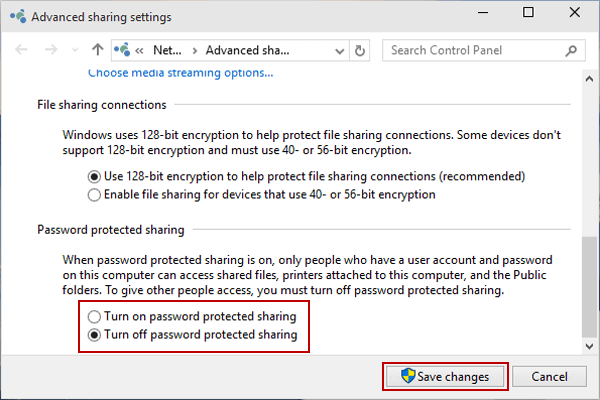
Jack Alvarez said:So, I head over to the Network and Sharing Center, click through to the option for changing advanced sharing settings, and then I go ahead and select

image

if that’s what we’re talking about, but even after doing all that, I still can't seem to get into those files.

He'll probably need to check his router settings to see which user is active or if it's just sitting on the factory defaults (like Admin/Admin or Admin/12345 or whatever).
Network password issues in IT Support ·
Jack Alvarez said:My English isn't exactly top-tier, so why don't you go ahead and draft it up? We can take a look together afterward and see if anything gets lost in translation 😁

You’ll probably need to head into the Control Panel and look for the Network and Sharing Center.
There should be an option in there to disable the password.
Anyone still running Windows 7? in Software ·
Harold Price4 said:Hey guys... first post here and I'm already running into issues.

So, basically... for about a month and a half now, my PC has been shutting itself down randomly...

Everything runs fine normally... it only shuts down while I'm gaming... I have Titan Quest and Fifu 2015 installed... up until about 15 days ago it wasn't happening that often, but lately... it's happened maybe 30 or 40 times.

I had no clue what was causing it... couldn't figure out the deal... until I checked the Event Manager.

Critical error... specifically Kernel Power... event ID 41... task category 63... I'm no expert... but I'm thinking it might be the power supply or the graphics card? Maybe.

Anyway... running Windows 7... 3 cores... AMD Radeon HD 6530... AMD A6-3500.

Thanks in advance... maybe someone else has dealt with this before... thanks for the help.

Get this to a repair shop immediately; you're basically living on borrowed time here. If you keep waiting, there's a very real chance you'll fry your GPU or your motherboard. The system is likely shutting down because it can't cool the processor, and it's triggering an emergency shutdown to protect itself. While you're cleaning out the fans and dust, you should definitely replace the thermal paste used to pull excess heat away from the CPU.
Found an old vintage laptop! in Laptops ·
Susan Rivera73 said:Greetings. I find myself in need of some technical guidance—I’ve recently come across an old-school laptop that appears to be in pristine condition, almost suspiciously so. The issue, however, is that it refuses to boot into Windows. I have spent quite a bit of time poking around the BIOS settings, but so far, my efforts have yielded absolutely nothing. To make matters worse, there isn't even a USB port available, which effectively eliminates any modern troubleshooting via flash drives. On a separate note—and perhaps this is premature—is this machine actually worth anything? I happened to spot a similar model listed on eBay for around $250, though one can never be too certain about those online valuations.

View on imgur
View on imgur
View on imgur

http://www.pcguide.com/ts/x/sys/booterrGBER47-c.html
You probably need to check the CMOS battery and swap it out if it's dead. If that doesn't fix it, the motherboard might be fried.
Lisa Perez50 said:Hey there.

I've got a virus. Every time I use Chrome, my search engine gets hijacked from Google.com to either Bing or DuckDuckGo.

I tried following the guide over at Malwarebytes, but I'm stuck. I managed to get through step two, but nothing else. There’s nothing to uninstall for the first step, and I can't even finish step three because my trial version expired.

What am I supposed to do to kill this annoying thing? Or whatever it is. It's driving me crazy. Help me out!

image

You don't need the premium version of Malwarebytes; the free one works just fine. Just make sure you uncheck the box that says "enable free trial of mbam premium" during installation. You can also try this within Chrome: https://support.google.com/chrome/answer/3296214?hl=en
You can also activate a free license for Hitman (it lasts for 30 days).
Anyone still running Windows 7? in Software ·
Nicholas Nguyen said:For the last two days, my Windows 7 machine has been stuck on "checking for updates" indefinitely. It just loops for hours whenever I have the laptop turned on.

The last successful check and download happened back on April 12th.
The only thing currently installed is the Windows Defender update (Definition 1.217.1113.0)

Where could the issue be?

Just grab the offline update package from here: http://download.wsusoffline.net/
It’ll take a bit longer to process, but it will pull everything you're missing. Basically, you download the zip file, unpack it somewhere, and run it. It'll prompt you to select your OS version and any additional components—like Visual C++, .NET Framework, Defender, etc.—and then ask where you want to save the files or if you want to move them to a USB drive. Just create a local folder and set that as the path. Start the process and wait for everything to download into that specific folder. Once it's finished, there will be an installer inside that folder; run that, wait for the installation to complete, reboot, and you're done.
Afterward, you can check if the update service is behaving itself. If not, the OS itself might just be acting up.
Dennis Gonzalez said:Hey,

Every single time I install a batch of updates and shut down my PC, the next boot triggers an application ERROR 0 cx0000005, which basically bricks everything—I can't open any programs at all. My workaround has been booting into Safe Mode to uninstall the updates, which gets the system running normally again. Then, I just hide those specific updates in the settings to prevent them from triggering again. I've done this dance multiple times now. Occasionally, I get lucky and figure out which specific update is the culprit by searching online or stripping them out one by one, but I'm wondering if there's actually a more permanent fix for this headache?

Honestly, the smartest move here is just to do a clean reinstall of Windows. Just make sure you back up your data first.
Trouble installing Windows XP in IT Support ·
rowdypilot53 said:Seeking some assistance here. I am attempting to install Windows XP on my vintage machine (an Athlon 3000 with an 80 GB hard drive) because performance has become quite sluggish. I inserted the installation CD and formatted the drive without creating any partitions. The system booted from the disc successfully, and I progressed through the initial stages—installing devices and configuring regional settings like the date and time. However, once it reached the network installation phase, everything simply stalled. The progress bar froze halfway through the network setup and hasn't moved at all, even after leaving it overnight. I attempted the process again with a different installation CD, but encountered the exact same issue.

Does anyone have any advice on how to proceed?

Have you checked the drive yet? It might have bad sectors.
Driver issues in IT Support ·
James Thomas80 said:Why does this keep popping up? :

image

You might find some relief using this tool: http://www.bleepingcomputer.com/down...ir-all-in-one/
Just make sure you back everything up first.
System freezing issues in IT Support ·
restlessbison40 said:I have a Dell Inspiron 5520 laptop, about 3 years old now, and I’ve been dealing with this issue for a while where it just randomly freezes up. Then, after maybe 20 or 30 seconds—who knows how long, really—it unfreezes. It’s happening way too often...
I’m not sure what the root cause is. I did a relatively recent clean installation of Windows 10, so I doubt it's a Windows issue, nor should it be a matter of the laptop being underpowered, since this is actually a very solid machine.
I’ve already run HD Tune, memtest86, and HDSentinel, and none of them reported any errors.
Could it be a driver issue? Maybe I messed something up during the install, though I don't think so. Is there a way to verify that?
It also occurred to me that dust might be a factor. Like I mentioned, the laptop is roughly 3 years old and I haven't cleaned the dust out of it once. Could that be the culprit? It seems strange that dust alone would cause these kinds of hangs, though. Besides, I haven't noticed any excessive overheating...

Anyway, does anyone have any ideas or advice?

PS: Laptop specs:

Operating System
Microsoft Windows 10 Education 64-bit
CPU
Intel Core i7 @ 2.20 GHz 55 ° C Ivy Bridge 22
Ivy Bridge 22nm Technology
RAM
6,00GB Dual-Channel DDR3 @ 798MHz (11-11-11-28)
Motherboard
Dell Inc. 0 XWH1P (U3E1)
Graphics
Generic PnP Monitor (1366x768@60Hz)
Intel HD Graphics 4000 (Dell)
1024MB AMD Radeon HD 7600M Series (Dell)
Hard Drives
Drives 699 GB Western Digital WDC WD7500BPVT-75HXZT3 (SATA) 41 °C
Optical Drives
PLDS DVD+-RW DS-8A8SH
Audio
High Definition Audio Device

You could try a Windows refresh (reinstall) to see if that fixes things. If it doesn't help, you're probably looking at a hardware failure.
Anyone still running Windows 7? in Software ·
Adam Williams2 said:Should I go with x86 or x64 for this new laptop? Give me the short version—what’s the actual difference and when should I pick one over the other?🤷

The rule of thumb is pretty simple: if you have 4GB of RAM or more, go with x64. If you're dealing with 3GB or less, stick to x86.🙂
Is my hard drive dying? in IT Support ·
Andrew Gomez40 said:Man, my hard drive started acting incredibly sketchy yesterday.
It went from running perfectly fine to basically crawling through molasses in a single instant. That red activity light just went absolutely haywire, staying lit up constantly like it was possessed. Even opening the most pathetic, tiny little file takes like thirty seconds now, and folders are hanging for 15 seconds apiece. My boot time shot up to at least five minutes—and look, normally I’m booting in about 60 seconds because my macOS is installed on a Hard Drive, but clearly, this isn't the culprit here. It honestly feels like the thing is on its deathbed. Right this second, I'm frantically trying to move my most critical files onto a thumb drive, but I'm stuck with these agonizing speeds of maybe 208 KB/s.

Basically, the whole thing just chokes whenever I try to copy or load anything off it, though otherwise, it stays quiet and the light goes dark. Like I said, everything else feels totally normal since the OS is sitting on the Hard Drive, which is behaving itself just fine.

That drive is packed with everything under the sun, stuff I absolutely cannot afford to lose, so I'm begging for answers to a couple of things:
- Is it actually dead? This thing has been running pretty much non-stop for two years (I rarely shut the PC down, though it usually idles at night) without a single hiccup until now.
- Why on earth is the boot process so slow if the macOS is loading from the Hard Drive?
- How am I supposed to move hundreds of gigabytes over to an external drive when the transfer speeds are this criminally slow?

I'm not even losing sleep over the hardware itself. These things have a shelf life, and clearly, this one hit the expiration date. I'll just go out and grab a new one, easy peasy. But losing all my data? That would be a straight-up catastrophe, and right now, I have no clue how to rescue it when the speed is practically non-existent.

Check the drive to see if any bad sectors have appeared. You could use a program like CrystalDiskInfo.
External drives not being recognized in IT Support ·
Alexander James15 said:Alright, I found it. It’s pretty weird that there isn't a way to get to that setting through the Control Panel.

Anyway, the system picks up the drive immediately and says it's healthy, but it won't let me actually touch any of my files. Every single option is grayed out except for Delete and Help.😢

In my opinion, you're going to have to run some data recovery software; there are plenty of options available online. Once you've grabbed what you need, you'll likely need to format the drive because it's probably corrupted.